Math in Nuke, the series: Merge & Premultiplication · The Grade Node · ColorCorrect · Saturation, Hue & HSV · Keying · Despill · Matching Colour & Light · Edge Extend · Lin, Log & Gamma · Filtering & Resampling · Edge Detection · Vectors · Trigonometry · Expressions & Curves
The same light can be written down with different curves. Linear stores it as it is, sRGB and gamma bend it for screens and 8-bit files, log squeezes many stops of a camera into a small range. None of them changes the picture, they change the numbers. And the numbers matter, because every Merge, Blur and Grade does maths on them.
Useful Links
- https://help.pixotope.com/phc/24.3/linear-light-and-compositing
- Tiberius Viris: Color Space Management, sRGB, Linear and Log
- https://opencolorio.org/old/configurations/spi_vfx.html
- https://en.wikipedia.org/wiki/SRGB
- https://en.wikipedia.org/wiki/Rec._709
- https://docs.acescentral.com/specifications/acescct/
- https://learn.foundry.com/nuke/content/comp_environment/expressions/adding_math_functions.html
Index
- 01. Linear: numbers proportional to light
- 02. Stops and 18% grey
- 03. sRGB and gamma
- 04. Why the maths wants linear
- 05. Log
- Transfer Lab (try it here)
- Nodes to paste in Nuke
01. Linear: numbers proportional to light
In a scene linear image a value of 0.4 means twice the light of 0.2. Values can go well above 1 (a lamp, the sun on chrome) and there's no "white", only more light. That's how light behaves in the real world, and that's why Nuke converts everything to linear when it reads a file and works in linear float internally.
02. Stops and 18% grey
Photographers count light in stops: one stop more is twice the light. In linear this becomes a simple rule: +1 stop = ×2, −1 stop = ÷2. The reference is middle grey, 18% reflectance, a value of about 0.18 in scene linear.
value = 0.18 × 2stops stops = log2(value / 0.18)
So an exposure change in a comp is a Multiply by 2stops (there's a node at the bottom), and "half a stop" is ×1.414.
03. sRGB and gamma
Our eyes are much more sensitive to changes in the darks than in the brights. If a file stored linear values in 8 bits, it would waste most of its 256 levels on highlights and leave the shadows in steps. So screens and 8-bit files use a curve that gives more codes to the darks: sRGB.
sRGB = 12.92 × L if L ≤ 0.0031308
sRGB = 1.055 × L1/2.4 − 0.055 otherwise
It's very close to a pure gamma 2.2, with a small straight piece near black that avoids problems with the infinite slope of a power curve at 0. Rec.709 (video) uses a similar curve with a different toe. Middle grey 0.18 in linear becomes about 0.46 in sRGB, which is why grey "looks" like 0.5 on a monitor.
Top: a linear ramp shown without the curve, the darks are squeezed. Bottom: the same ramp with the sRGB curve, the steps look even.
04. Why the maths wants linear
A blur averages pixels, a Merge adds them, a defocus spreads light: they are all sums of light, and sums of light are only right on numbers proportional to light. Do the same blur on sRGB values and the bright lights lose their energy, the edges between colours get dark and muddy.
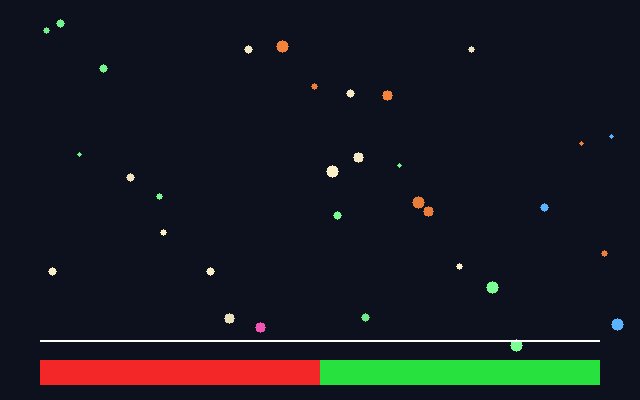
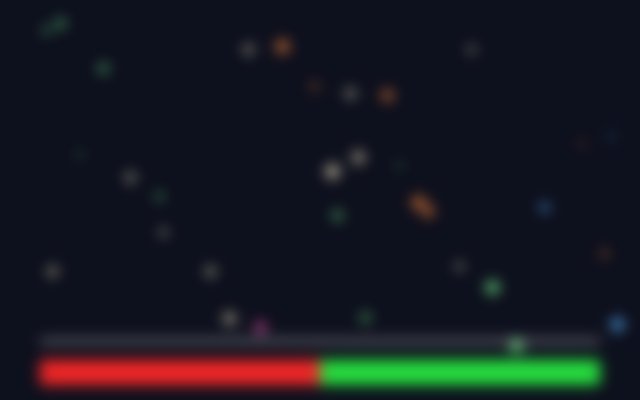
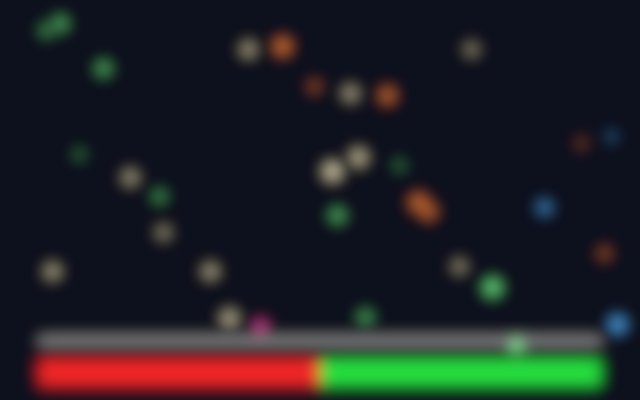
Look at the line between red and green: in sRGB it gets a dark band, in linear it blends into a warm yellow, like real light. Same with the small lights: in linear they keep their glow. This is why the bokeh needs linear highlights above 1.
05. Log
A log curve gives every stop roughly the same number of codes. A camera can record 14 stops or more, and in log they fit nicely in a 10 or 12 bit file, with room for the highlights. It's great for storing and for grading by hand (a log grade feels like moving exposure). It's wrong for compositing maths: convert log to linear, comp, convert back.
The classic is Cineon: 10-bit codes with black at 95 and reference white at 685. Modern camera curves (LogC, S-Log3, Log3G10...) and ACEScct follow the same idea. ACEScct in its log part is simply (log2(x) + 9.72) / 17.52: literally stops, scaled.
Let OCIO do the conversions (Read colourspace, OCIOColorSpace): the curves in this page are for understanding, checking and the occasional expression. Nuke's expressions also have from_sRGB() and to_sRGB() helpers, listed in Foundry's table of maths functions.
Transfer Lab
The same linear value written with five curves. Move the exposure and read the numbers: linear doubles at every stop, log moves by the same step every stop, sRGB is somewhere in between.
Nodes to paste in Nuke
Click a box, copy it (Ctrl+C / Cmd+C) and paste it in Nuke's Node Graph (Ctrl+V / Cmd+V).
Exposure in stops. A Multiply by pow(2, stops): +1 is twice the light, −1 half.
Stops from grey. Shows every pixel as stops above or below 0.18: 0 is middle grey, +3 is three stops brighter. Useful to compare plates and CG.
Linear to sRGB by hand. The sRGB formula of chapter 03 in an Expression node.
The math series
The other pages about maths in Nuke:
Merge & Premultiplication
The Grade Node
ColorCorrect
Saturation, Hue & HSV
Keying
Despill
Matching Colour & Light
Edge Extend
Filtering & Resampling
Edge Detection
Vectors
Trigonometry
Expressions & Curves
And if you like this, have a look at the Matrices in Nuke series.