Math in Nuke, the series: Merge & Premultiplication · The Grade Node · ColorCorrect · Saturation, Hue & HSV · Keying · Despill · Matching Colour & Light · Edge Extend · Lin, Log & Gamma · Filtering & Resampling · Edge Detection · Vectors · Trigonometry · Expressions & Curves
Some passes look like colourful nonsense: a rainbow sphere, a gradient that goes green and blue. They aren't colours, they are vectors stored in three channels: a direction (normals), a position (P) or a movement (motion vectors). With three operations, length, dot product and cross product, you can relight, key by 3D position and build your own utility passes in Nuke.
Useful Links
- https://learn.foundry.com/nuke/content/comp_environment/3d_compositing/relighting_2d_images.html
- https://lesterbanks.com/2012/10/understanding-relighting-in-nuke/
- https://learn.foundry.com/nuke/content/comp_environment/3d_compositing/lighting.html
- https://en.wikipedia.org/wiki/Dot_product
- https://en.wikipedia.org/wiki/Cross_product
- https://en.wikipedia.org/wiki/Lambertian_reflectance
Index
- 01. A vector in three channels
- 02. Length and normalize
- 03. Dot product: relight
- 04. Cross product
- 05. Position pass: 3D mattes
- 06. Motion vectors
- Vectors Lab (try it here)
- Nodes to paste in Nuke
01. A vector in three channels
A vector is three numbers (x, y, z), and an image has three channels (r, g, b): every pixel can carry one. The scene below has a beauty and two vector passes:
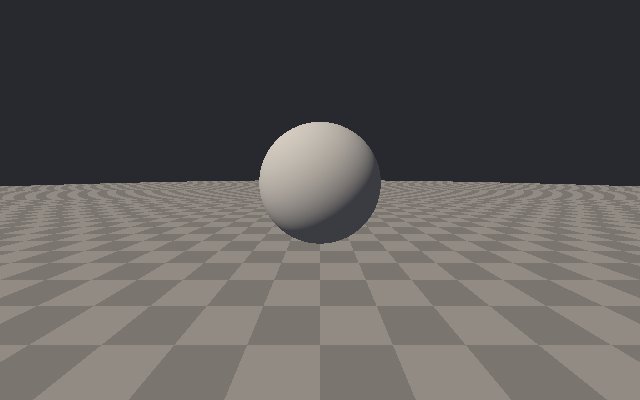
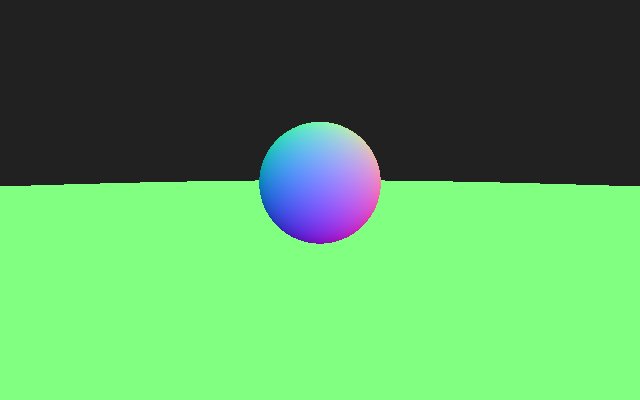
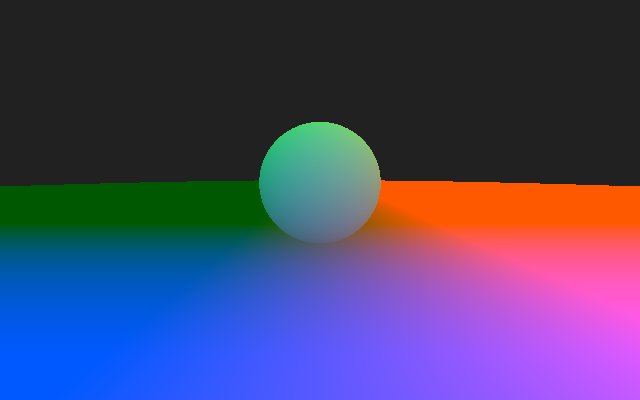
Normals go from −1 to 1 (here shown as n × 0.5 + 0.5 so you can see them: up is green, so the floor is green). Positions are in scene units and can be anything. That's why these passes must be float EXR, never 8 bit, and never colour managed: they are data, not colours.
02. Length and normalize
length = √(x² + y² + z²) normalized = (x, y, z) / length
The length of the difference between two points is their distance. A normalized vector has length 1 and keeps only the direction: normals should already be normalized, but filtering, resizing or a motion blur can shorten them, and a quick normalize fixes it (node at the bottom).
03. Dot product: relight
N · L = Nx·Lx + Ny·Ly + Nz·Lz = |N| |L| cos θ
With two normalized vectors, the dot product is the cosine of the angle between them: 1 when they point the same way, 0 when they are perpendicular, negative when they face away. Take the normal N and the direction of a light L, and max(0, N·L) is exactly the diffuse light of a matte surface (Lambert). Three multiplications and two additions per pixel, and you have a new key light.
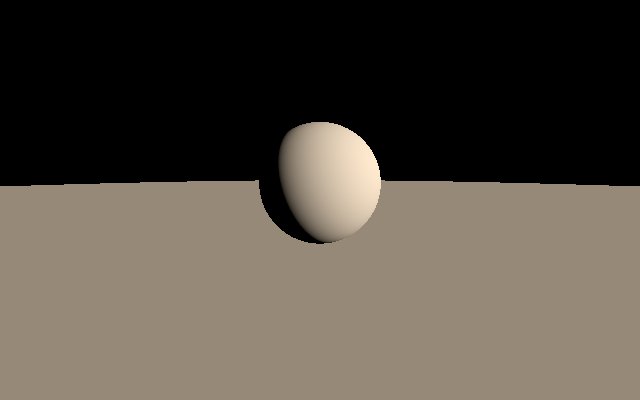
Normals and light must be in the same space. Normals in world space need a light direction in world space; normals in camera space need it in camera space. The ColorMatrix page shows how to rotate normals from one to the other. With the camera direction instead of a light, N·V is the facing ratio: 1 where the surface looks at the camera, 0 on the silhouette, a classic for rim and fresnel effects. Nuke's Relight node does all this with real 3D lights.
04. Cross product
A × B = (Ay·Bz − Az·By, Az·Bx − Ax·Bz, Ax·By − Ay·Bx)
The cross product of two vectors is a third vector perpendicular to both. Its main use in comp: building normals when you don't have them. The difference between the P of a pixel and its neighbour on the right, crossed with the difference with the neighbour above, is perpendicular to the surface: a normal pass made from a position pass. It's also how you build the "up" and "right" axes of a camera from its direction.
05. Position pass: 3D mattes
With P, the distance between a pixel and a point you choose is just the length of P − centre. A smoothstep on that distance gives a soft sphere matte that sticks to the geometry, follows the camera move and goes through objects, without any roto.
matte = 1 − smoothstep(r × (1 − softness), r, |P − centre|)
Replace the distance with a single axis (P.y > height) and you have a height matte for fog, with P.z a depth matte. The node is at the bottom: pick the centre with the colour picker on the P pass.
06. Motion vectors
A motion vector pass stores, in two channels, how many pixels each pixel moves between two frames (u horizontally, v vertically). The length √(u² + v²) is the speed, atan2(v, u) the direction. VectorBlur smears every pixel along its vector; more about the old and new VectorBlur in my Vector Blur tutorial. A speed matte (length of the vectors) is great to add extra blur or grain only where things move fast.
Vectors Lab
A sphere and its normals. Drag on the sphere to move the light, hover to read N, L, the dot product and the angle. Change the shading to see the other dot-product tricks.
Nodes to paste in Nuke
Click a box, copy it (Ctrl+C / Cmd+C) and paste it in Nuke's Node Graph (Ctrl+V / Cmd+V). Shuffle the pass into rgb first.
Relight N·L. Normals in rgb, a light direction in the User tab: the diffuse light of chapter 03, multiply it on the albedo or use it as a matte.
Position matte. P in rgb, a soft sphere matte in the alpha. Set centre, radius and softness in the User tab.
Normalize. Brings every vector back to length 1.
The math series
The other pages about maths in Nuke:
Merge & Premultiplication
The Grade Node
ColorCorrect
Saturation, Hue & HSV
Keying
Despill
Matching Colour & Light
Edge Extend
Lin, Log & Gamma
Filtering & Resampling
Edge Detection
Trigonometry
Expressions & Curves
And if you like this, have a look at the Matrices in Nuke series.