

"Make it sit." "Split the difference." "The edges feel crunchy." "CBB." In your first weeks in a studio, the notes you get in dailies can sound like a foreign language. This is the dictionary I wish I'd had: what supervisors really mean, and what to try in Nuke, from ten years of notes received and given.
Index
- 01. How notes work: dailies, leads and supervisors
- 02. "It doesn't sit": integration notes
- 03. Edge notes
- 04. Motion and tracking notes
- 05. Colour and light notes
- 06. Taste notes: "split the difference" and friends
- 07. Production jargon: CBB, final, temp, hero
- 08. How to take a note (and how to push back)
- 09. Where to go deeper
01. How notes work: dailies, leads and supervisors
Most studios review work every day in dailies: a room (or a call) where new versions play on a calibrated screen, and the comp lead or the VFX supervisor comments shot by shot. The notes are then written in the tracking system (ShotGrid/Flow, ftrack) next to your version. Later the client side, the production VFX supervisor and sometimes the director, gives notes too: those travel back through your supervisor.
- Notes are short on purpose. There are fifty shots to review in an hour; "edges are crunchy on the left arm" is a full sentence.
- They describe what they see, not always the fix. "It feels CG" is a symptom; your job is to find the cause.
- A note is about the shot, never about you. Senior artists get notes on every version too.
02. "It doesn't sit": integration notes
The most common family of notes. Something added to the plate (CG, a matte painting, a keyed element) doesn't feel like it was photographed with the rest.
| the note | what it usually means | what to try in Nuke |
|---|---|---|
| "Make it sit" / "sit it in" / "seat it" | The element looks stuck on top of the plate. | Check blacks, whites and contrast against the plate, then grain, edges, defocus and lens effects, in that order. |
| "It feels CG" / "it looks stuck on" | Too clean, too sharp, too perfect, or lit from a different direction. | Match the softness and grain, add the plate's lens artefacts (chromatic aberration, vignette), check the light direction with the lighting artist. |
| "Match the blacks" / "the blacks are lifted" | The darkest part of the element is darker or milkier than the plate's. | Sample the darkest values of both and match them with a Grade (blackpoint/lift). See The Maths of Match. |
| "Crush the blacks" / "it's too milky" | Not enough contrast in the shadows. | Lower the lift or the blackpoint; check the plate's real black level first. |
| "It's floating" / "needs a contact shadow" | The object doesn't touch the ground: no shadow or occlusion where it meets the surface. | Add a soft contact shadow and ambient occlusion, matched in colour and density to the plate's shadows. |
| "Needs more atmosphere" / "more depth" / "more haze" | Distant things are as contrasty as close ones. | Use depth to add haze: lift the blacks and lower the contrast with distance, in the plate's haze colour. |
| "The grain doesn't match" / "it's too clean" | The element has no grain, or grain of the wrong size or strength. | Degrain/regrain per channel, matched on the plate (DasGrain is the standard tool). See Grain and noise. |
| "It reads small" / "the scale feels off" | Something gives away the size: too much detail, too sharp at distance, motion too fast for its size. | Add atmosphere, soften fine detail, slow down secondary motion; check against real references. |
| "Needs interaction" | The element doesn't affect its world: no dust, splashes, reflections or light on the surroundings. | Add elements (dust, debris, splashes), reflections and light spill on the plate. |
03. Edge notes
Edges are where a comp is won or lost, and where supervisors look first.
| the note | what it usually means | what to try in Nuke |
|---|---|---|
| "Crunchy edges" / "hard edges" | The matte edge is too sharp or aliased compared with the plate's softness and motion blur. | Soften the matte where the plate is soft, match motion blur, avoid eroding too much; work on the edge, not the whole matte. |
| "Dark line" / "matte line" / "halo" | A dark or bright outline: background colour or bad premultiplication in the edge. | Check premult/unpremult order, extend the foreground colour into the edge. See Edge Extend. |
| "The edges are chattering" / "boiling" / "sizzling" | The matte edge changes from frame to frame. | Stabilise or temporally smooth the key, clean the plate's noise before keying, check the roto for jumps. |
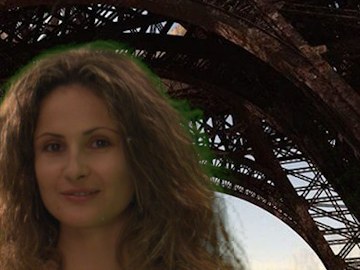
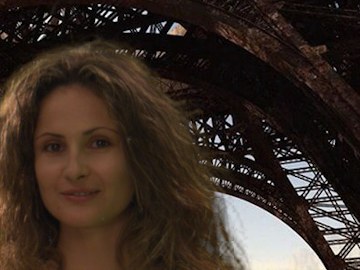
| "Green spill" / "it's picking up green" | The screen colour bounces onto the subject, especially hair and edges. | Despill, then restore the lost brightness. See Despill. |
| "Needs light wrap" | The background light doesn't wrap around the foreground edges. | A subtle light wrap from the background into the edge. See Edge Rim Light. |
| "We lost the hair detail" | Fine hair is gone or chunky. | Combine a hard core matte with a soft edge key for the hair; never one key for everything. See Keying. |
04. Motion and tracking notes
| the note | what it usually means | what to try in Nuke |
|---|---|---|
| "It's sliding" / "drifting" / "swimming" | The element doesn't stick to the plate: the track is off. | Check the track on a high-contrast feature close to the element, use more points, or go to a planar or 3D track. |
| "It's jittery" / "there's chatter" | Small frame-to-frame noise in the track. | Smooth the track curves carefully, or track a better feature; never smooth real camera shake away. |
| "The motion blur doesn't match" | The element is sharper or blurrier in motion than the plate. | Match the shutter: VectorBlur or the renderer's blur, compared frame by frame with the plate. See Vector Blur. |
| "It pops" / "there's a pop on frame 1012" | Something changes suddenly from one frame to the next. | Step through the frames around the note; look for a keyframe, a roto shape or a matte that jumps. |
| "It feels too light" / "no weight" | The animation or the camera shake doesn't sell mass. | Usually an animation note; in comp, add shake and interaction on impacts. |
05. Colour and light notes
| the note | what it usually means | what to try in Nuke |
|---|---|---|
| "It's too hot" / "it's blown out" | Highlights are too bright or clipped compared with the plate. | Check the values in linear light, not only on the monitor; compare with the brightest things in the plate. |
| "It's flat" | Not enough contrast or shape in the light. | Add contrast with a Grade, or ask lighting for a stronger key; avoid fixing it all in comp. |
| "Warm it up" / "cool it down" | Change the colour temperature, often in the highlights or the shadows only. | A Grade with gain (highlights) or lift (shadows) on red and blue. See The Maths of Grade. |
| "It's too saturated" / "too punchy" | Colours stronger than the plate's. | Lower the saturation, then check the hue; plates are often less saturated than CG. |
| "Check it in the grade" / "check it through the LUT" | The shot might look fine in your viewer but break once the show LUT or the grade is applied. | Review through the show's colour pipeline and push the exposure up and down to see hidden problems. See Tech check and QC. |
| "It's gone soft" | The image lost sharpness, usually from too many filtering steps. | Concatenate transforms, filter once, check the filter type. See Filtering. |
06. Taste notes: "split the difference" and friends
The hardest notes have no number in them. They are about how much, not what.
- "Split the difference": you showed two versions (or the client wants something between yours and theirs). Go halfway: if one version had a gain of 1.4 and the other 1.0, try 1.2.
- "Take it down a notch" / "dial it back": keep the idea, use less of it. Often 20 to 30% less, not half.
- "Push it" / "more": the opposite. Push it further than you think; it's easier to pull back from too much.
- "It's reading as…": what the audience understands at first glance. "It's reading as a miniature" means the scale cues are wrong, even if every pixel is technically right.
- "It draws the eye" / "it's distracting": something pulls attention away from where the story is: too bright, too sharp, too much movement.
- "Make it more cinematic" / "more filmic": usually softer highlights, richer blacks, some lens character, and less perfect detail.
- "In the ballpark" / "we're close": the direction is right; now it's about details. Don't start again.
- "On the nose": exactly right, or, about an idea, too obvious. The tone tells you which.
- "Less is more": remove an element, an effect or a correction, and look again.
- "Trust the plate": the photography is the reference for everything; match it rather than improving on it.
- "It's a bit busy": too many things compete for attention; simplify the frame.
- "Sell it": make the audience believe it, usually with interaction, shake, light and sound-like timing.
- "Ground it": make it feel physically present: contact shadows, reflections, dust, weight.
- "Let it breathe": leave space or time; don't fill every frame with detail or movement.
- "Pull it back to where it was": the previous version was better; go back and keep only what the note asked.
- "Same note as before": the last note wasn't addressed, or not enough. Re-read it, and ask if needed.
- "Eyeball it": no measured reference; match it by eye against the plate.
- "Good for now": close to CBB; move on to the other shots and come back if there is time.
07. Production jargon: CBB, final, temp, hero
| term | meaning |
|---|---|
| Shot | The unit of work: one continuous piece of film between two cuts, with a code like SEQ_010_0020. You are cast on shots, and every note refers to one. |
| Sequence | A group of shots in the same scene or location, usually lit and comped with a shared setup. |
| Plate / clean plate | The footage shot on set. A clean plate is the same framing without actors or objects, used to paint them out. |
| ETA | "Estimated time of arrival": when your next version will be ready. Give one you can keep. |
| FML | First, middle and last frame of the shot: rendering or checking only those three is a quick way to review a version before the full sequence. |
| CA | Creative approval: the look is approved, and what remains is technical work (cleanup, edges, QC) before the final. |
| Desk review / over the shoulder | Your lead looks at the shot at your desk, outside dailies, often for a quick direction. |
| Ping me | Send a message when it's ready; don't wait for the next dailies. |
| Burn-ins / slate | The text on the review frames (shot name, version, frame number, artist) so everyone talks about the same thing. |
| Lineup | A frame or a wipe that compares your version with the plate or with the previous version, at the same frame. |
| On hold | Stop working on the shot: editorial, the client or the bid might change it. |
| Round | One cycle of versions and notes. "We're on round three with the client" means two sets of notes already came back. |
| WIP | Work in progress: a version shown to get direction, not to be approved. |
| Temp / slap comp | A quick, rough version to check an idea or to give editorial something to cut with. |
| Hero | The most important shot, element or asset: the one the camera looks at closely, worth the most care. |
| Pre-comp it | Render part of the script to disk and read it back, to make the script lighter or to lock a piece of work. |
| Version up | Save a new version of the script before changing it; never overwrite what someone has seen. |
| Kick back / bounce back | A version sent back with notes, by the lead or by the client. |
| CBB | "Could be better": accepted for now, but improve it if there is time. Not a final. |
| Final / finaled / buyoff | Approved. Don't touch it again unless someone asks. |
| Pending client | Approved internally, waiting for the client's opinion. |
| Turnover | When editorial delivers the plates and the cut for the shots to start. |
| Handles | Extra frames before and after the cut, so editorial can adjust timing. |
| Cut length / locked cut | The frames used in the edit; once the cut is locked, timing changes stop (in theory). |
| Omit | The shot has been removed from the film. It happens, often to shots you loved. |
| Bid | The estimated time for a task. If a note is bigger than the bid, tell your lead. |
| Tech check / QC | The technical review before delivery: frame range, format, colour, dead pixels, matte lines. |
| Fresh eyes | Someone who hasn't seen the shot yet: they notice what you stopped seeing. |
08. How to take a note (and how to push back)
- Write it down exactly as said, with the frame number. Paraphrasing loses information.
- Ask when it isn't clear. "When you say it feels CG, is it the edges or the light?" is a good question, not a weak one.
- Address every note in the next version, and say what you did. If you didn't do one, say why.
- Change one thing at a time when you're unsure, so you know which change fixed it.
- Show a wipe or a side by side with the previous version: it makes your change easy to see.
- Push back with images, not words. If you think a note makes the shot worse, show both versions and let the eye decide.
- Look at the shot in context: play the shots before and after yours. A note often comes from continuity.