I've been a compositor for more than ten years, on films and series at DNEG, Weta FX, Framestore, MPC and other studios, and for the last five I've also been a mentor: I review reels of students and juniors every season. The same handful of things decides almost every one of them. This guide is what I tell them: what the person watching your reel is really looking for, how to cut a compositing reel, how to show your breakdowns, how to write a shot list, and how to organise the website around it.
Index
- 01. Who watches your reel, and how
- 02. What studios look for in a compositing reel
- 03. Length and order: the first ten seconds
- 04. Breakdowns: from plate to final
- 05. The shot list: say exactly what you did
- 06. No production shots yet? A student portfolio
- 07. The portfolio website
- 08. VFX portfolio examples
- 09. Mistakes I see every season
- 10. Checklist before you hit send
01. Who watches your reel, and how
Picture the real situation. A comp supervisor or a recruiter has a folder of links and twenty minutes between dailies. They open yours, often with the sound off, and they scrub. If the first shot is good they keep watching; if it isn't, they close the tab and open the next one. Nobody is unfair here: they simply have too many reels and a show that needs people now.
So a reel is not a showcase of everything you've ever done. It's an answer to one question: "can I give this person a shot tomorrow and get it back finished, at the quality of the show?" Everything in this guide comes from that question.
02. What studios look for in a compositing reel
Read a few compositor job posts from the big studios and the same words come back: plate-based compositing, set extensions, CG and FX integration, keying, roto and paint, an eye for colour and light, Nuke. Python and gizmo writing are a plus, never the main thing. On a reel, that translates into:
| they look for | what it means in a shot |
|---|---|
| photoreal integration | CG, elements and plate sit in the same light: black levels, colour of the shadows, contrast, highlights |
| clean edges | keys with real hair and motion blur, no halos, no chattering roto, controlled spill |
| the camera | matching grain, defocus, motion blur, lens distortion, chromatic aberration, flares where they belong |
| invisible work | paint-outs, rig removals, set extensions and screen replacements that you can't spot |
| consistency | a sequence of shots that match each other, not one lucky frame |
| taste | knowing when to stop: nothing over-graded, over-glowed or "cool for the reel" |
Notice what's missing: flashy titles, music, a long list of software. A compositor is hired for the eye. The integration checks are the same ones I go through in the Matching Colour & Light, Keying, Despill and Edge Extend tutorials, if you want the maths behind them.
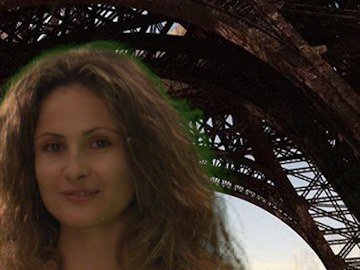
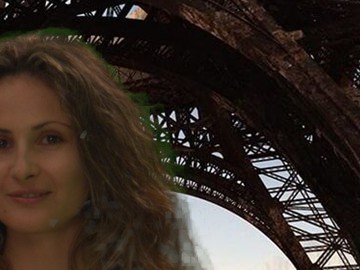

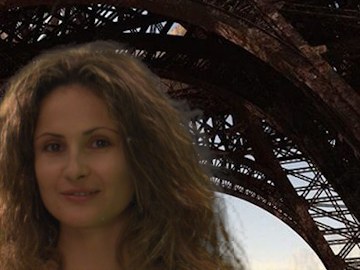
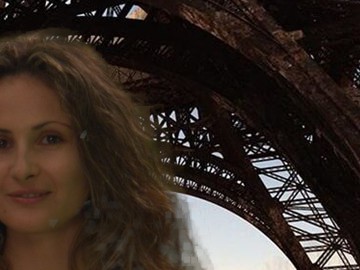

Top: the problem. Bottom: the same image fixed. Examples from my own tutorials (click to read them): on a reel, these details decide whether a shot looks finished.
In the recruiters' own words
I'm not the only one saying this. Here is what people who hire for big studios have written about reels, in short (the links are to the full articles):
- Framestore · showreel checklist for juniors
About 45 seconds, two minutes at most, best work first. Overlay text with the tasks you actually did, the software and your collaborators. A Vimeo link without password, plus an MP4.
Read the checklist - Ben Owen · Global Head of Recruitment, MPC
A minute or two is the maximum: a few seconds of high quality beat a long reel of work they can't use. For a compositor: show the mattes and passes you used, so they know what you did.
Creative Bloq, 2014 - Outpost VFX · pro showreel tips
Catch the eye in the first few seconds, keep only your best material, keep the reel focused on one discipline and tailor it to the studio. Music is optional: many recruiters watch muted.
Read the tips - Jorge Razon · VFX Supervisor, SOHO VFX
Show range (keys, roto, paint, CG and practical integration) and combine tasks in one shot. Check every comp at pixel level: errors show even on compressed video. Keep breakdowns to a few quick wipes, and be ready to explain how you QC.
CG Spectrum - DNEG · compositor job posts
The reel they ask for: plate-based compositing, set extensions, FX and CG integration, all finished to a high standard.
DNEG careers
03. Length and order: the first ten seconds
For a student or a junior, one to two minutes is the right length, and shorter is fine: forty-five seconds of strong work beats two minutes where half is filler. With years of credits a senior reel can run longer (mine is under three minutes), but only if every shot still earns its place. The reel is only as good as its weakest shot, because that's the one the supervisor remembers.
- Best shot first. Not "chronological", not "the most recent": the one you're proudest of. The first ten to thirty seconds decide whether the rest gets watched.
- Variety, but no repetition. One great keying shot says you can key. Four keying shots say you can only key. Show a range: CG integration, keys, set extension, FX, a paint-out, and if you have it, a few shots from the same sequence that match each other.
- Cut the weak shots. If you hesitate about a shot, it goes. Nobody has ever been rejected because their reel was too short.
- Title card: two or three seconds. Name, "Compositor" (or "Junior Compositor"), email. No logo animation.
- End card: the same, plus your website and where to find the shot list. Hold it long enough to be read and to take a screenshot.
- Music: keep it discreet and assume nobody will hear it. Never cut the edit to the beat at the expense of the shots. Prefer royalty-free music: a commercial song can get the video muted or blocked on some platforms.
04. Breakdowns: from plate to final
In compositing the final image alone proves very little: a supervisor can't tell what was in the plate and what you added. The breakdown is where you show your work. On my own reel and in my portfolio I always show the plate next to the final, like this Fast X shot from DNEG, where the plate is a set with a blue screen and the final is the street:


The same on a Captain Marvel shot I composited at Trixter: on set there was only a green stand-in, in the final there's Goose the cat. Two frames tell the whole story, without a word.


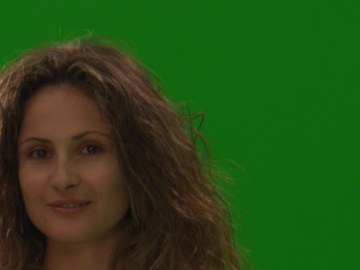

A breakdown in four readable steps, from my keying and despill tutorials: plate, key, comp, final.
A good breakdown is short and readable. What works:
- Final first. Show the shot as the audience saw it, at full speed. Then the breakdown, then the final again if the shot is short.
- Few steps. Plate → key or roto → CG and elements → final. Four to six steps, not your whole node tree. If a step doesn't change anything visible, drop it.
- Hold each step one or two seconds, or use a wipe that moves slowly across the frame. Flashy transitions between steps hide exactly what you want to show.
- Label the steps with a small, readable caption: "plate", "key", "CG", "final". Same font, same position, every shot.
- Show the mattes when they're the work. A clean alpha of a hard key with motion blur and fine hair is impressive on its own.
- Loop the hard part. If the difficulty is the edge of a moving character, a slowed-down crop on that edge is worth more than the whole frame.
A Nuke script screenshot can be interesting for a technical role, but it's never a replacement for the images: a supervisor judges the result, not how many nodes it took.
05. The shot list: say exactly what you did
Every professional reel comes with a shot list (or breakdown sheet): one line per shot with what you did on it. In production, nobody does a shot alone: the plate was shot by a crew, CG came from lighting, the FX from the FX team. That's normal, and nobody expects otherwise, but you have to say it. A reel where it's unclear what's yours is the quickest way to lose trust, and the industry is smaller than you think: the supervisor of that show may be the one watching.
| # | time | project · studio | my work | not mine |
|---|---|---|---|---|
| 01 | 0:02 | Feature film · Studio name | compositing: CG integration, key, set extension, grain and lens | CG lighting, FX, matte painting |
| 02 | 0:11 | Series · Studio name | compositing: full shot, paint-out, roto | — |
| 03 | 0:19 | Personal project | everything: shoot, track, CG, comp | plate from a stock library (name it) |
Put it as a PDF linked from the end card and from your website (here is my breakdown PDF), or as text under the video, the way I do in the description of my reels on Vimeo. Show the shot number as a small caption in the corner of the reel too, so the supervisor can find it in the list.
About NDA: many shows can't be shown until they're released, and some studios have their own rules about reels. Ask the studio before you publish, wait for the release, and when in doubt send a password-protected link only to the person who asked. The public reel stays public.
06. No production shots yet? A student portfolio
Every student has this problem, and studios know it. What they want to see in a VFX student portfolio is that the basics are solid, because those are exactly the shots a junior gets on a show: roto, paint, keying, simple CG integration, set extensions. Better three shots that look like production shots than ten that look like exercises.
- Use real plates. Shoot your own if you can (a phone camera in log is enough to start), or use plates made for practice: free footage from ActionVFX, the green screen plates on Hollywood Camera Work, the open movie Tears of Steel with its original plates (I use one of them in my keying tutorial, below).
- Don't reproduce the tutorial. If your shot is the same plate with the same result as a popular course, the supervisor has already seen it twenty times. Take the technique and apply it to a different plate.
- Make it hard on purpose. Hair on a messy screen, motion blur, a moving camera, a reflection: difficulty you solved is worth more than a clean, easy shot.
- Group projects count. School short films are often the best material a student has, as long as you say clearly which shots and which tasks were yours.
- Junior to mid: when you have production shots, they replace the personal ones, one by one, starting from the weakest.
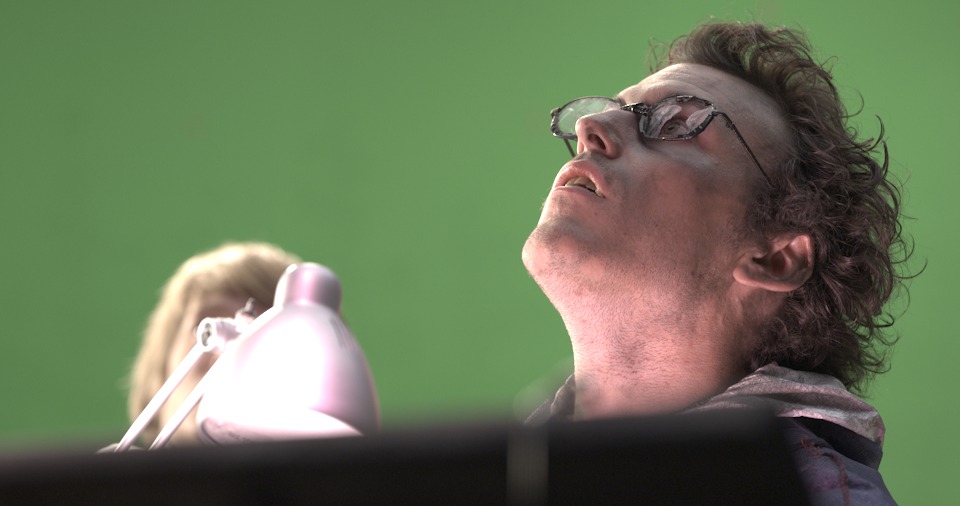

Left: a green screen plate from Tears of Steel ((CC) Blender Foundation, mango.blender.org), free to practise on. Right: a key of fine hair, the kind of difficulty worth showing.
07. The portfolio website
A VFX portfolio website doesn't need to be clever. It needs to make the reel play in one click and answer the next three questions: who are you, what exactly did you do, how do I contact you. This is how I organised mine, and what I'd copy from it:
- The reel at the top. First thing on the portfolio page, already embedded (Vimeo or YouTube), no click-through to another site. Mine is the first thing on my VFX portfolio page.
- Before/after, interactive. Under the reel, a few plate/final pairs a visitor can wipe through at their own pace: it's the quickest way to show what you did on a shot.
- A grid of projects with your role. Poster, title, and a single word for what you did on it ("Compositing", "Prep", "Roto"). Click for the trailer or a project page with breakdowns and credits.
- About and CV. A short, human introduction, the studios, the tools, the CV as a page and as a PDF. See my about page.
- Contact, without friction. An email address and LinkedIn. I removed the contact forms from my site: they collected mostly spam, and recruiters prefer to write from their own inbox anyway.
- Fast and on the phone. Many people will open your link from a phone, between meetings. Compress images, check it on mobile, keep it light.
- Your own name as the domain, the same link in your CV, LinkedIn, email signature and on the end card of the reel.
- Keep it alive. Date the reel ("Reel 2026"), update it when a show comes out, and remove old work that no longer represents you.
No password on the portfolio, no "under construction", no auto-playing music. If you also write tutorials or make tools, give them their own section: for a compositor, a few Nuke tutorials or gizmos show how you think, which is exactly what a lead wants to know.
08. VFX portfolio examples
The fastest way to understand all of this is to look at real portfolios: what to copy is the structure, never the shots. Here is a selection from different sites, from professionals to students, with what I'd notice in each one.
Professional compositors
 Andrea GeremiaSenior Digital Compositor · this siteReel at the top, before/after you can wipe, every project with its role.
 Kollen WasyleanVFX Compositor · ArtStationA comp-only reel for film and TV, with the selected credits listed right under it.
 Matt RadfordVFX / FX / Compositing · ArtStationA reel that mixes FX and comp, titled so you know what to expect.
Students and graduates
 Johannes PeperDigital Compositor · The RookiesPeople's Choice 2025: a comp-focused student reel, with a clear title and role.
 Laura Catherine WhittyCompositing Reel 2024 · The RookiesA breakdown for every shot: keying, tracking, plate clean-up.
 Antoine BarbannaudEnv., Lighting & Comp TD · The RookiesRookie of the Year in Visual Effects 2024: the level the best students reach.
 Sara StanoeskaCourse exercise · ArtStationClean-up, 2D track and CG integration, with what was done where and the footage credited.
 Sophie DessureaultSchool shot · ArtStationOne shot, Nuke and Unreal, and a breakdown that explains the techniques.
 The Ghoul ProjectShort film breakdown · ArtStationA group film that credits the whole crew, role by role: do the same.
My students at Side Academy
Group projects where I followed the compositing as a mentor. They were entered in the Rookie Awards, and their pages are good examples of how to present a school project: final images first, then breakdowns, wireframes and the credits of every student.
 Age of DinosaursRookie Awards 2026 · VFX
 The Scarif BattleRookie Awards 2026 · 3D Animation
 Durin's BaneRookie Awards 2025 · 3D Animation
 Pacific RimRookie Awards 2025 · 3D Animation
More student work from the school on The Rookies. Browsing the winners of past years there is one of the best ways to calibrate your own level.
09. Mistakes I see every season
- A long intro with a logo, a quote, a montage of the best moments. The supervisor skips it, or closes the tab.
- The same shot type over and over. Six screen replacements, or six sky replacements.
- Edits to the beat, cuts too fast to see anything, shots shorter than a second.
- Over-graded finals: teal-and-orange everything, crushed blacks, glows and flares everywhere. A comp reel must look like the film, not like a trailer of it.
- Missing camera: CG with no grain, perfectly sharp edges over a soft plate, no motion blur on a fast object.
- Unclear credits: a full CG shot from a show with no word on who did what.
- Dead links: a private Vimeo, a Google Drive that asks for access, a PDF on an expired WeTransfer.
- One reel for every job. If you apply for compositing, the reel is compositing. Your lighting or modelling can live on another page.
10. Checklist before you hit send
- The reel is as short as it can be (one to two minutes for a student or a junior), and the first shot is the best one.
- Every shot would survive on its own; nothing is there just to fill.
- Each shot has a short breakdown (plate → steps → final), with labels.
- Grain, blacks, edges, defocus and motion blur checked on every shot, full screen.
- A shot list says what's yours and what isn't, with numbers matching the reel.
- Name, role and email on the first and the last card.
- The link plays in one click, without login, on a phone too.
- The website has the reel at the top, your role on every project, a CV and an email.
- The same link is in your CV, on LinkedIn and in your email signature.
- Someone else watched it, with the sound off, and told you which shot to cut.
That last point is the most useful one. If you'd like that someone to be me, send me your reel: the first review is free. I watch it the way a supervisor would and write back what I'd keep, what I'd cut and what I'd fix, shot by shot. For a deeper follow-up there is my mentorship.
Useful Links
- The Rookies: student portfolios and the Rookie Awards
- Framestore: showreel checklist for junior VFX artists
- Creative Bloq: how to get a job at MPC (Ben Owen, Global Head of Recruitment)
- Outpost VFX: 8 pro showreel tips
- CG Spectrum: demo reel and interview tips (Jorge Razon, SOHO VFX)
- The Rookies: what VFX employers look for in interns
- ArtStation: compositing reels
- DNEG careers: what a compositor job post asks for
- Framestore careers
- ILM careers
- ActionVFX: stock elements and practice footage
- Hollywood Camera Work: practice plates
- Tears of Steel: open movie with its original plates
- VFXjobs: job board
Next: my VFX portfolio & showreel · Mentorship and reel reviews · Nuke tutorials