I created this tutorial and modified 2 Nuke nodes because I wanted to explore how a matrix can apply a 2D transform.
You can download the Transform node with the Matrix here:
Download Transform from Nukepedia
Read more about TransformMatrix
You can download the Corner Pin node with the Matrix here:
Download CornerPin from Nukepedia
Read more about CornerPin_Matrix
Matrices in Nuke, the series: Convolution Matrix · Transform Matrix · ColorMatrix · Convolve & Deconvolution · 3D Matrices · Morphology · CornerPin & Homography · BlinkScript Matrices
Useful Links
- http://community.foundry.com/discuss/topic/101782
- http://www.nukepedia.com/written-tutorials/using-the-nukemath-python-module-to-do-vector-and-matrix-operations/all
- https://www.geeksforgeeks.org/python-program-to-find-transpose-of-a-matrix/
- https://gist.github.com/julik/1164618
- https://en.wikipedia.org/wiki/Transformation_matrix
- https://www.tutorialspoint.com/computer_graphics/2d_transformation
- https://medium.com/hipster-color-science/computing-2d-affine-transformations-using-only-matrix-multiplication-2ccb31b52181
- https://www.slideshare.net/dinakan1/2-d-transformations
- http://web.iitd.ac.in/~hegde/cad/lecture/L6_3dtrans.pdf
- https://www.cs.brandeis.edu/~cs155/Lecture_06.pdf
- http://www.it.hiof.no/~borres/j3d/math/twod/p-twod.html
- https://en.wikipedia.org/wiki/Homogeneous_coordinates
- https://en.wikipedia.org/wiki/Affine_transformation
- https://it.mathworks.com/discovery/affine-transformation.html
- https://www.slideshare.net/akbrightfuture/2-d-transformations-by-amit-kumar-maimt?next_slideshow=1
- https://www.slideshare.net/darokoblog/2d-transformations-in-computer-graphicscomputer-graphics-tutorials
Overview
I remember the first operation I wanted to do with Photoshop: scaling a picture!
Transformation means changing some graphics into something else by applying rules. We can have various types of transformations such as translation, scaling up or down, rotation, shearing, etc. When a transformation takes place on a 2D plane, it is called 2D transformation.
Transformations play an important role in image manipulation to reposition the graphics on the screen and change their size or orientation
A 2D transform needs a 3x3 matrix (the extra row and column are there for the translation, see the homogeneous coordinates below). Nuke stores its transforms as 4x4 matrices, the same size it uses in 3D: for a 2D move the third row and column simply stay as in the identity, so in the tables below you will see 4x4 matrices with a 3x3 transform inside.
- Vocabulary
- Translation: every point moves by the same distance in the same direction.
- Scaling: the image gets bigger or smaller, around a fixed point.
- Rotation: the image turns by an angle around a pivot.
- Reflection: the image is mirrored over a line (a flip or a flop).
- Shear (skew): one coordinate slides proportionally to the other, so a square becomes a parallelogram.
- Stretching: a scale in one direction only.
- Squeezing: stretch in one direction and shrink in the other by the same factor, so the area doesn't change.
Homogenous Coordinates and composite transformations
A composite transformation is when two or more transformations are combined to form a new image from
the original image. Basically the operation is a multiplication: matrix * matrix.
To perform a sequence of transformations such as translation followed by rotation and scaling, we need to follow a sequential process:
- Translate the coordinates
- Rotate the translated coordinates
- Scale the rotated coordinates to complete the composite transformation.
To shorten this process, we have to use a 3×3 transformation matrix instead of a 2×2 one. To convert a 2×2 matrix to 3×3 matrix, we have to add an extra dummy coordinate W.
In this way, we can represent the point by 3 numbers instead of 2 numbers, which is called Homogenous Coordinate system. To represent affine transformations with matrices, we can use homogeneous coordinates. This means representing a 2-vector (x, y) as a 3-vector (x, y, 1), and similarly for higher dimensions. Using this system, translation can be expressed with matrix multiplication.
It's important to understand that the matrix multiplication is NOT a commutative operation. In other words, the order of the operations is important. In the picture below, let's try to apply the translation and the rotation on the left image and the rotation/translation on the right one.
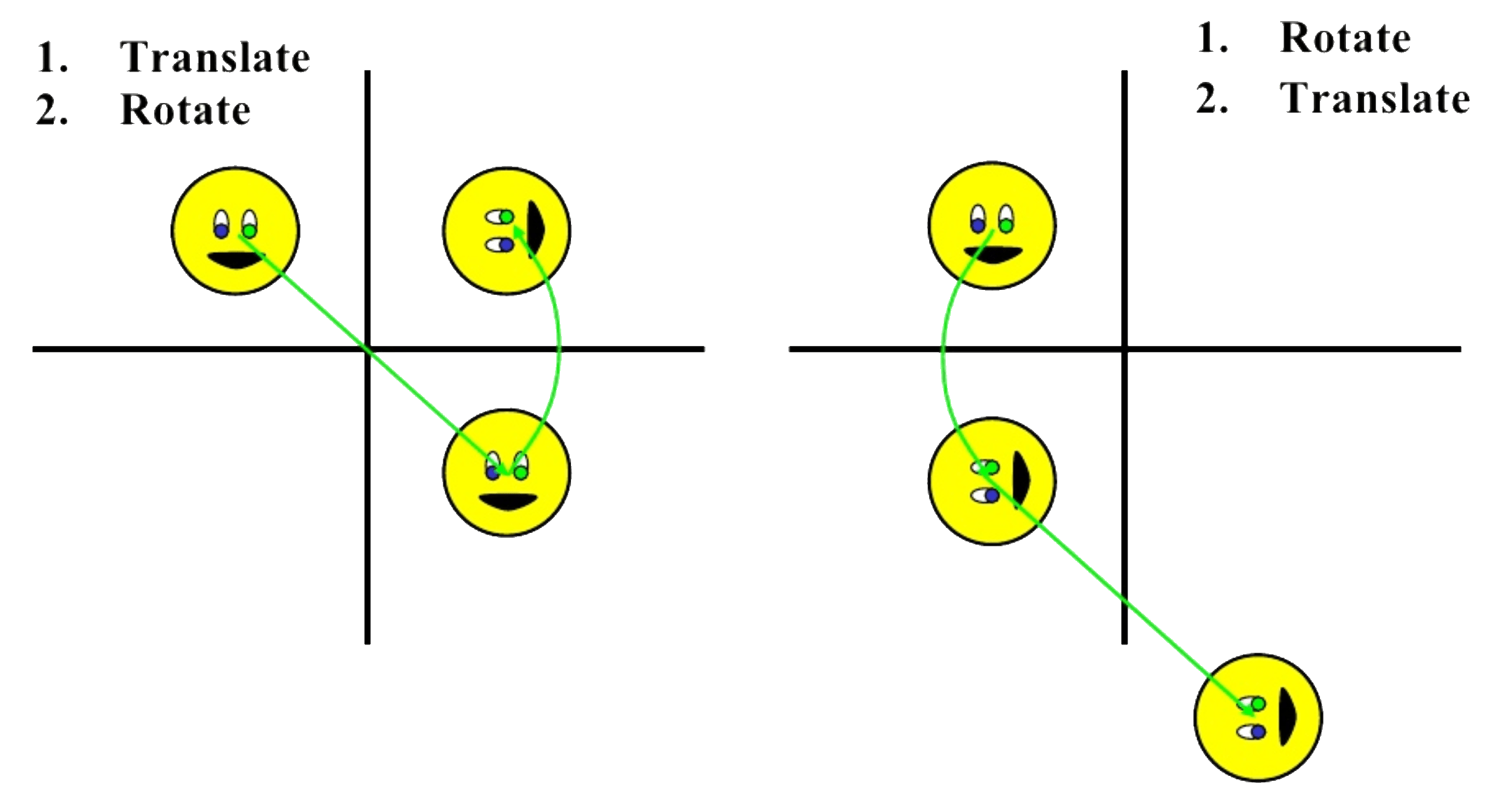
If a transformation of the plane T1 is followed by a second plane transformation T2, then the result itself may be represented by a single transformation T which is the composition of T1 and T2 taken in that order. This is written as T = T1∙T2.
Composite transformation can be achieved by concatenation of transformation matrices to obtain a combined transformation matrix.
A combined matrix −
Where [Ti] is any combination of: Translation, Scaling, Shearing, Rotation, Reflection.
The change in the order of transformation would lead to different results, as in general matrix multiplication is not commutative, that is [A] . [B] ≠ [B] . [A] and the order of multiplication. The basic purpose of composing transformations is to gain efficiency by applying a single composed transformation to a point, rather than applying a series of transformation, one after another.
- 1st example: ROTATE
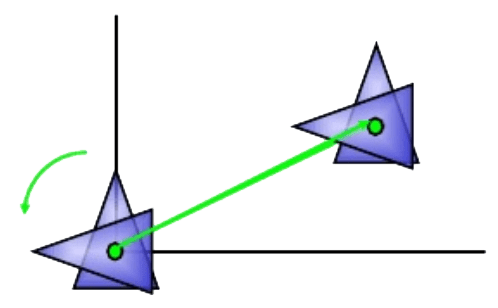
For example, to rotate an object about an arbitrary point (Xp, Yp), we have to carry out three steps:
- TRANSLATE (pivot point is moved to origin)
- ROTATE (about the origin)
- TRANSLATE (pivot point is returned to origin position)
- 2nd example: SCALE about FIXED POINT

For example, to scale an object about a general fixed-point, we have to carry out three steps:
- TRANSLATE (fixed point is moved to origin)
- SCALE (with respect to origin)
- TRANSLATE (fixed point is returned to origin position)
- 3rd example: GENERAL SCALING DIRECTION

To scale an object along a general scaling direction, we have to carry out three steps:
- ROTATE (scaling direction align with the coordinate axes)
- SCALE (with respect to origin)
- ROTATE (scaling direction is returned to origin position)
Affine Transformation
Affine transformation is a linear mapping method that preserves points, straight lines, and planes. Sets of parallel lines remain parallel after an affine transformation.
An affine transformation is an important class of linear 2-D geometric transformations which maps variables into new variables by applying a linear combination of translation, rotation, scaling and/or shearing operations.

In Nuke
In Nuke, the Transform and CornerPin nodes have a matrix knob. You can use them to convert the transformation into a 4x4 matrix.
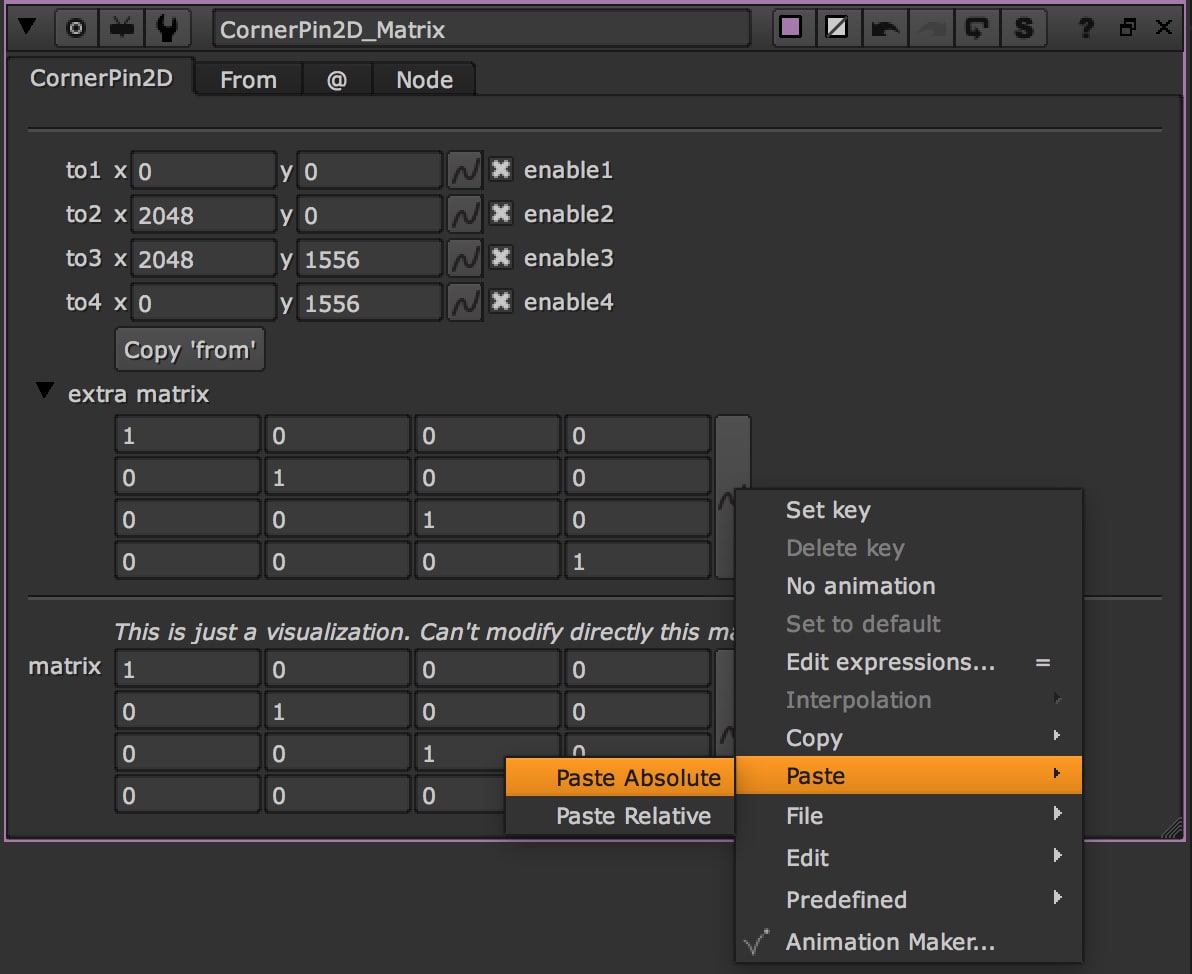
Click here to download these toolsWherever you find this text field in the article below, you can copy and paste the values directly into the Matrix 4x4 knob in the CornerPin node in Nuke.
Transform Lab
Move the sliders and watch the matrix change. The frame is a 1920x1080 format with the origin in the bottom-left corner and Y going up, like in Nuke. The Lab builds the transform in this order: scale, skew and rotate around the centre, then translate. Copy the 16 values and paste them in the extra matrix of a CornerPin2D to get the same move.
 0,0
0,0
Try: rotate with the centre in the corner (0, 0) and then in the middle, and look at how only the last column changes. That column is where the pivot "hides".
Matrices
If you are in love with Matrices :) I've also written this tutorial about the Convolution Matrix
Read More
Click on the link below to go directly there:
- 01. Identity Matrix / No Transformation
- 02. Reflection / Mirroring
- 03. Translation
- 04. Rotation about the Origin
- 05. Rotation about a Point
- 06. Scaling about the origin
- 07. Scaling and Rotation about the origin
- 08. Stretching
- 09. Squeezing
- 10. Shearing
- Original Image

- 01. Identity Matrix / No Transformation
The identity matrix transforms a point to itself: P1=P2=I·P1
This can be interpreted as translation with (0,0), rotation with 0 degrees (since cos (0)=1 and sin (0)=0), scaling with (1,1)
https://en.wikipedia.org/wiki/Identity_matrix
| 1 | 0 | 0 | 0 |
| 0 | 1 | 0 | 0 |
| 0 | 0 | 1 | 0 |
| 0 | 0 | 0 | 1 |
- 02. Reflection / Mirroring
A reflection is an example of a transformation that flips each point of a shape over the same line.
https://en.wikipedia.org/wiki/Reflection_(mathematics)
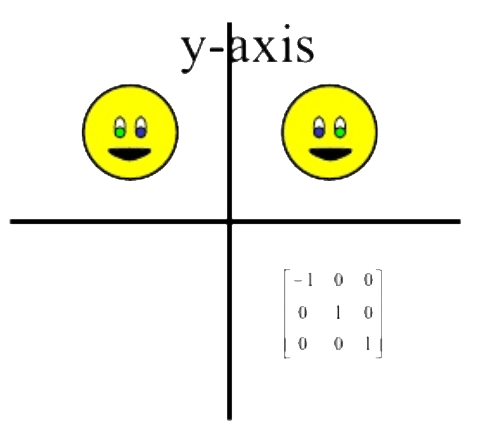
| -1 | 0 | 0 | 0 |
| 0 | 1 | 0 | 0 |
| 0 | 0 | 1 | 0 |
| 0 | 0 | 0 | 1 |

| 1 | 0 | 0 | 0 |
| 0 | -1 | 0 | 0 |
| 0 | 0 | 1 | 0 |
| 0 | 0 | 0 | 1 |

| -1 | 0 | 0 | 0 |
| 0 | -1 | 0 | 0 |
| 0 | 0 | 1 | 0 |
| 0 | 0 | 0 | 1 |

| 0 | 1 | 0 | 0 |
| 1 | 0 | 0 | 0 |
| 0 | 0 | 1 | 0 |
| 0 | 0 | 0 | 1 |
- 03. Translation
A translation moves an object to a different position on the screen. You can translate a point in 2D by adding translation coordinate (tx, ty) to the original coordinate (X, Y) to get the new coordinate (X’, Y’).
In this example I applied a translation of X=100 and Y=200
https://en.wikipedia.org/wiki/Transformation_matrix

| 1 | 0 | 0 | T.x |
| 0 | 1 | 0 | T.y |
| 0 | 0 | 1 | 0 |
| 0 | 0 | 0 | 1 |
- 04. Rotation about the Origin
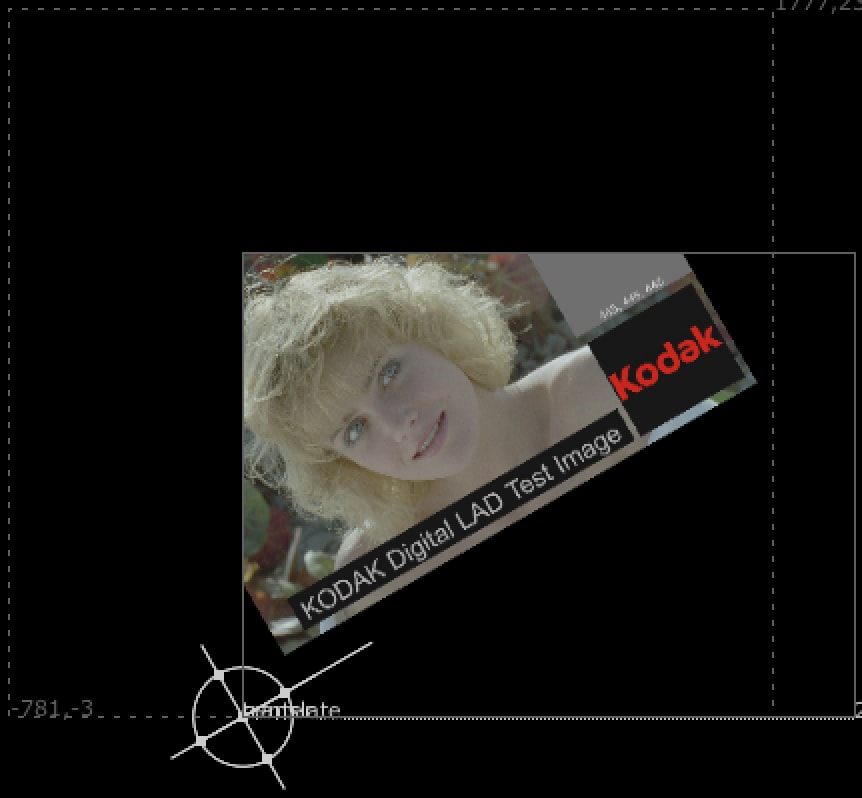
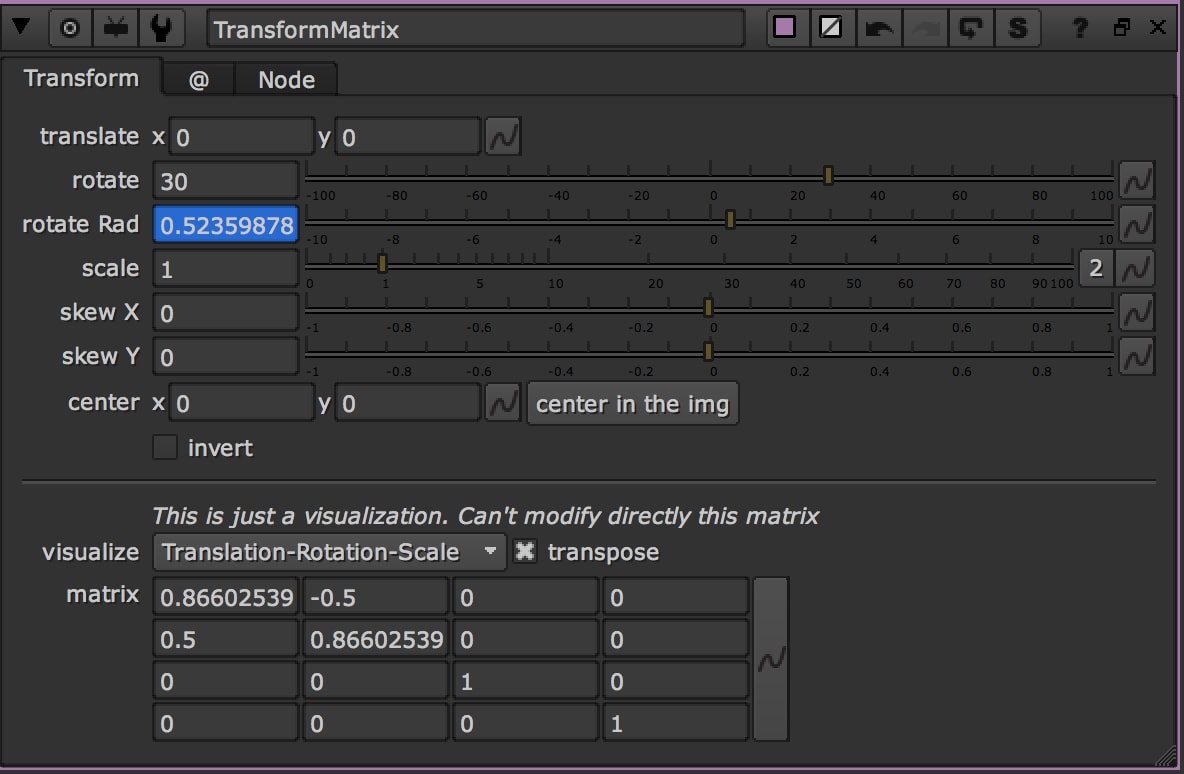
For rotation by an angle θ clockwise about the origin the functional form is x'=x*cosθ +y*sinθ and y'=-x*sin(θ) +y*cosθ. Written in matrix form, this becomes:


| cosθ | sinθ | 0 | 0 |
| -sinθ | cosθ | 0 | 0 |
| 0 | 0 | 1 | 0 |
| 0 | 0 | 0 | 1 |
In Nuke, any kind of Rotation has to be in Radians. If you want to convert a number from Degrees to Radians, apply this formula: Radians(x)
Similarly, for a rotation counterclockwise about the origin, the functional form is x'=x*cosθ - y*sinθ and y'=-x*sin(θ) + y*cosθ.
| cosθ | -sinθ | 0 | 0 |
| sinθ | cosθ | 0 | 0 |
| 0 | 0 | 1 | 0 |
| 0 | 0 | 0 | 1 |
- 05. Rotation about a Point
https://www.slideshare.net/msadiqns/two-dimensional-geometric-transformations
For rotation by an angle θ clockwise about a point, the functional form is x'=xr + (x-xr)*cosθ - (y-yr)*sinθ and y'=yr+(x-xr)*sin(θ) + (y-yr)*cosθ. Written in matrix form, this becomes:


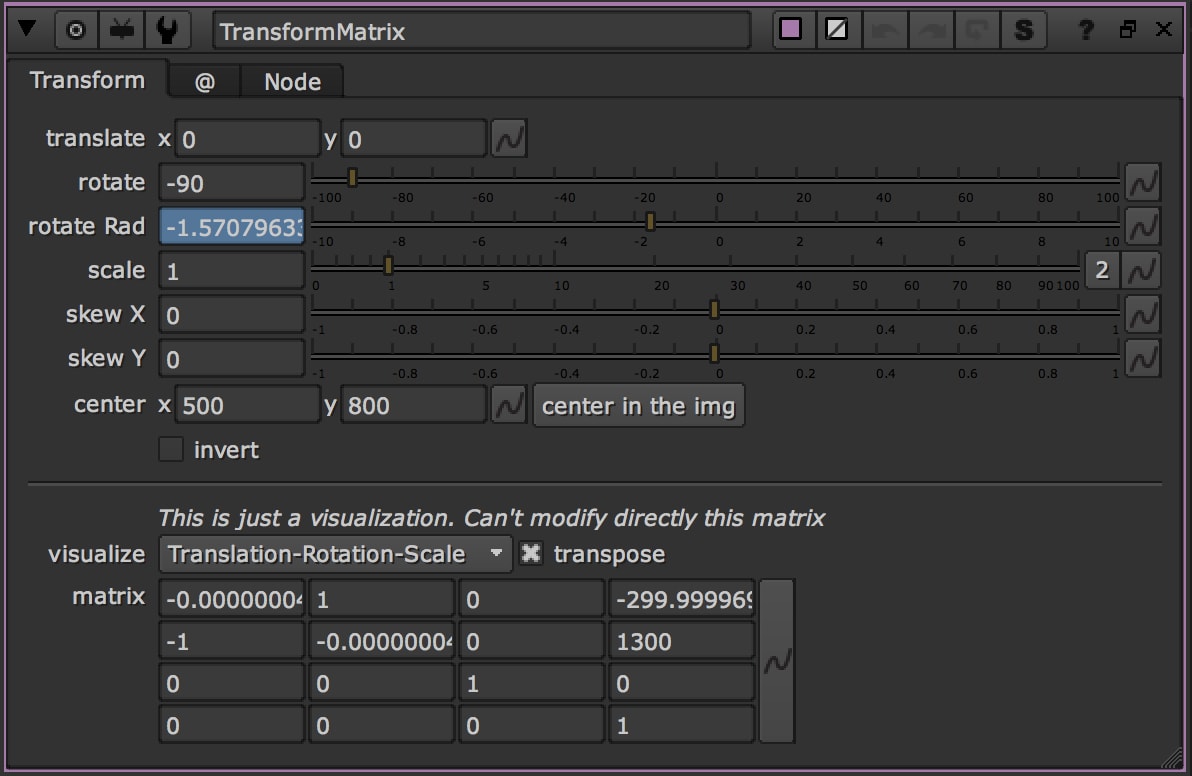
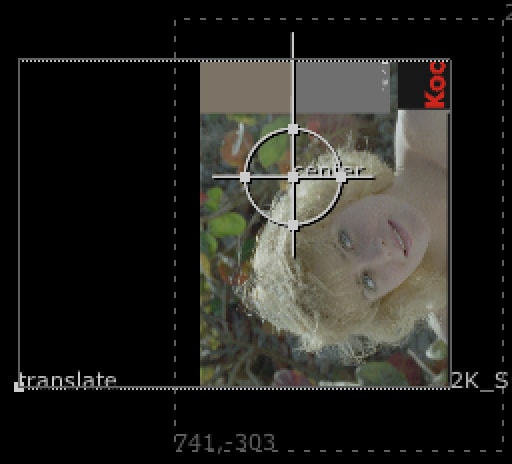
Let's explain this matrix better with an example: a clockwise rotation of 90° (in radians: 1.5708), centred in T = (500, 800).
sin(90°) = 1
cos(90°) = 0
So the final matrix would be:
| cosθ | sinθ | 0 | x |
| -sinθ | cosθ | 0 | y |
| 0 | 0 | 1 | 0 |
| 0 | 0 | 0 | 1 |
where x = T.x * (1-cosθ) - T.y * sinθ = 500 * (1 - 0) - 800 * 1 = 500 - 800 = -300
and y = T.y * (1-cosθ) + T.x * sinθ = 800 * (1 - 0) + 500 * 1 = 800 + 500 = 1300
In the second example, for a rotation counterclockwise about a point T, the functional form is x'=xr + (x-xr)*cosθ + (y-yr)*sinθ and y'=yr+(x-xr)*sin(θ) - (y-yr)*cosθ. Written in matrix form, this becomes:

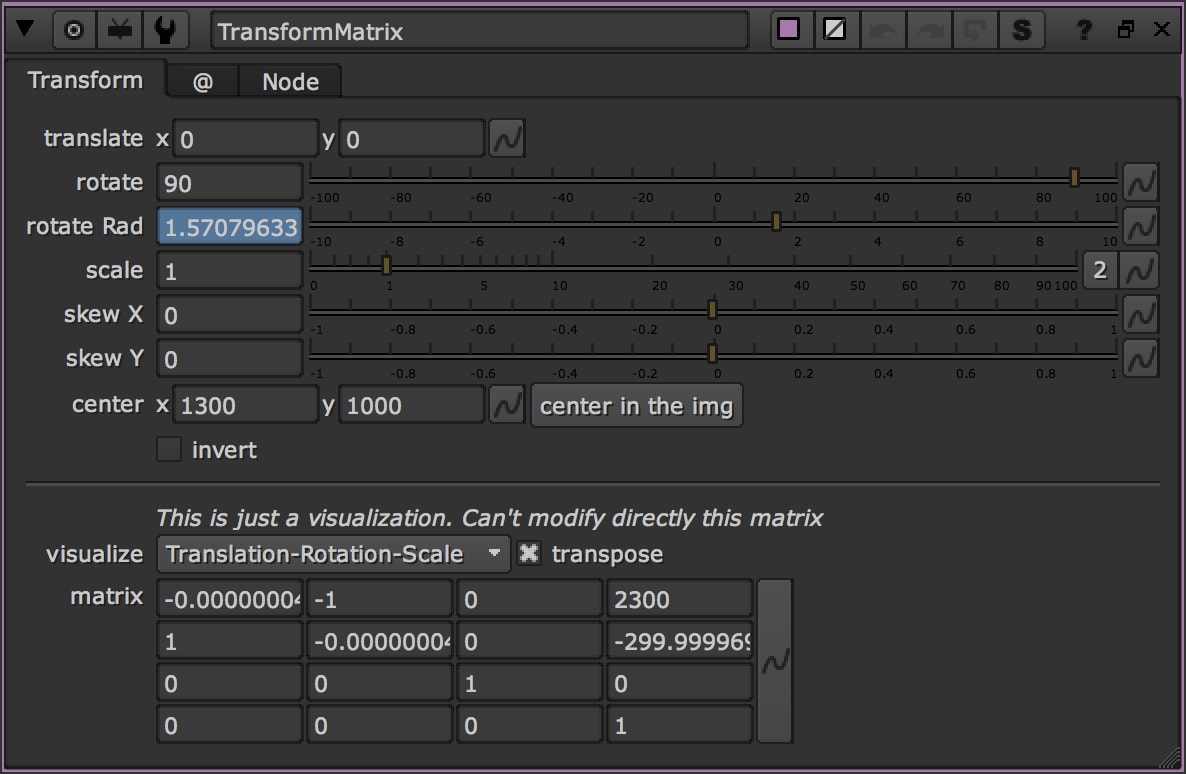
Let's explain this matrix better with an example: a counterclockwise rotation of 90° (1.5708 radians), centred in T = (1300, 1000).
sin(90°) = 1
cos(90°) = 0
So the final matrix would be:
| cosθ | -sinθ | 0 | x |
| sinθ | cosθ | 0 | y |
| 0 | 0 | 1 | 0 |
| 0 | 0 | 0 | 1 |
where x = T.x * (1-cosθ) + T.y * sinθ = 1300 * (1 - 0) + 1000 * 1 = 1300 + 1000 = 2300
and y = T.y * (1-cosθ) - T.x * sinθ = 1000 * (1 - 0) - 1300 * 1 = 1000 - 1300 = -300
- 06. Scaling about the origin
To change the size of an object, scaling transformation is used. In the scaling process, you either expand or compress the dimensions of the object. Scaling can be achieved by multiplying the original coordinates of the object with the scaling factor to get the desired result.
Let us assume that the original coordinates are (X, Y), the scaling factors are (SX, SY), and the produced coordinates are (X’, Y’). This can be mathematically represented as shown below −
X' = X * SX and Y' = Y * SY

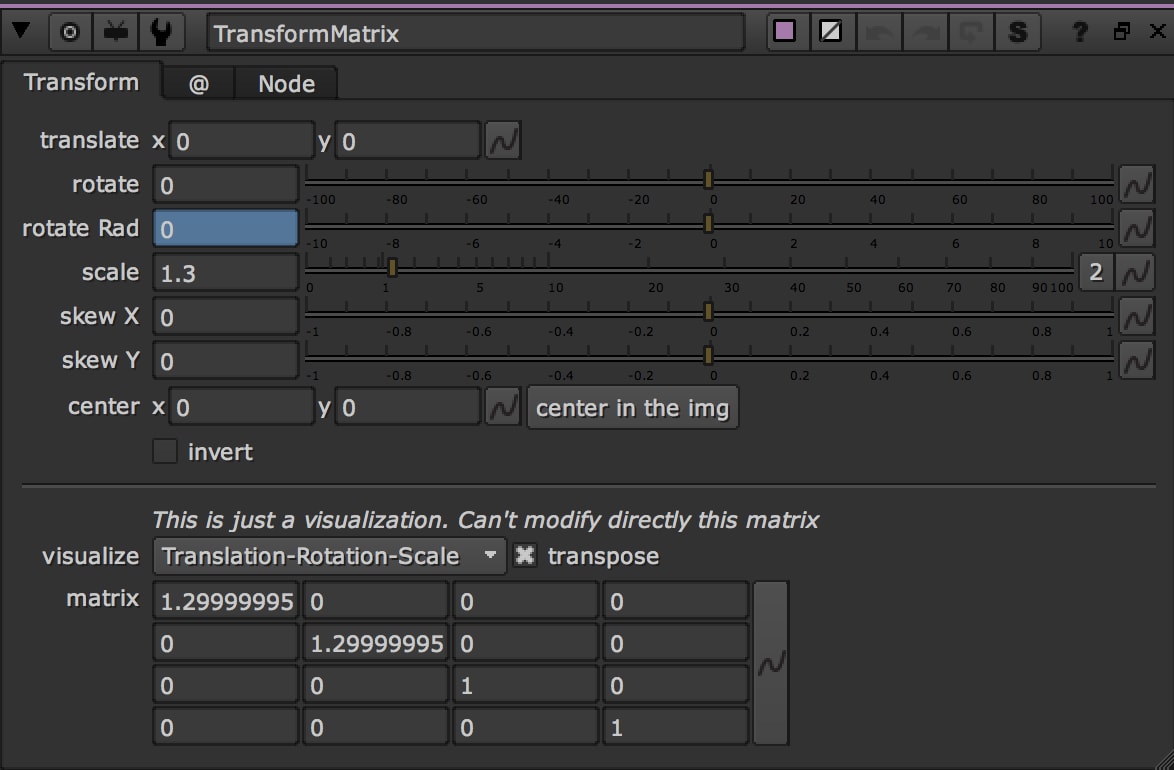
If we provide values less than 1 to the scaling factor S, then we can reduce the size of the object. If we provide values greater than 1, then we can increase the size of the object.
| Sx | 0 | 0 | 0 |
| 0 | Sy | 0 | 0 |
| 0 | 0 | 1 | 0 |
| 0 | 0 | 0 | 1 |
- 07. Scaling and Rotation about the origin
In this case we want to rotate and scale the picture about the origin 0,0
Rotation and scale combine by multiplying their matrices: M = R · S. In practice, every column of the rotation matrix is multiplied by the scale of that axis (cosθ and sinθ times SX in the first column, times SY in the second).
We want to apply a rotation of 180° and a scale of 2.
cos(180°) = -1
sin(180°) = 0
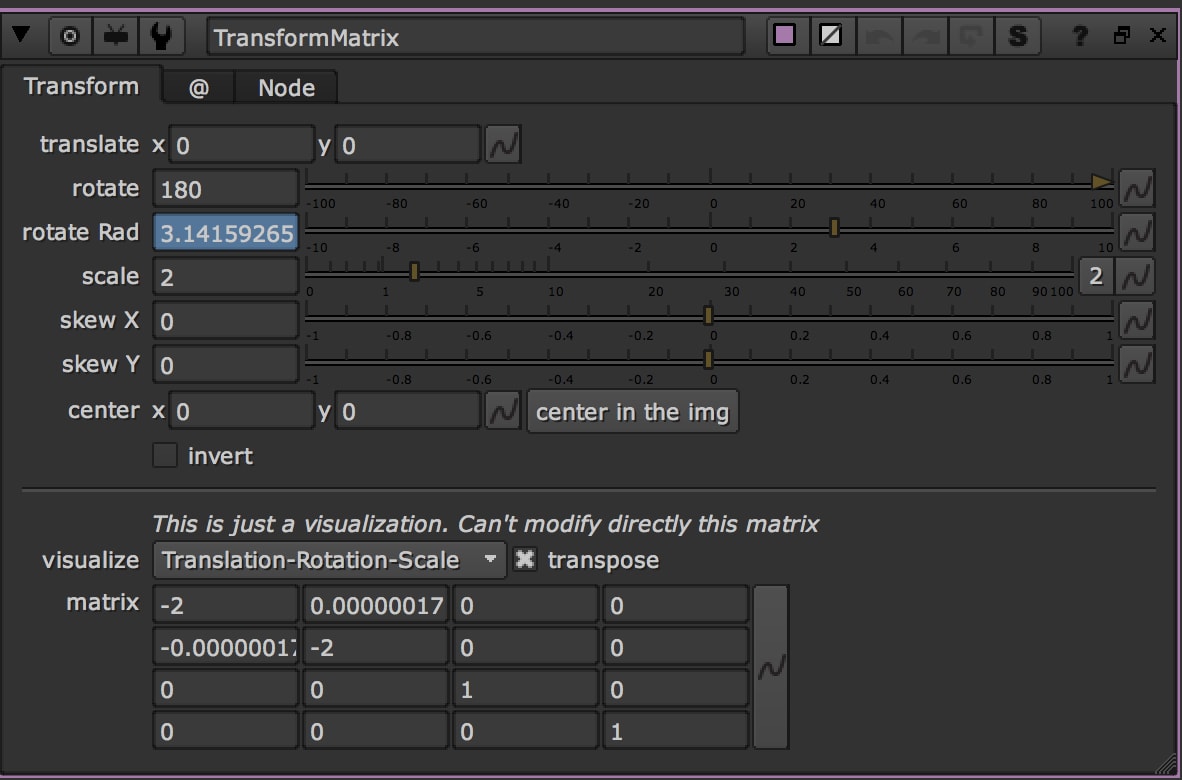
| X1 | X2 | 0 | 0 |
| Y1 | Y2 | 0 | 0 |
| 0 | 0 | 1 | 0 |
| 0 | 0 | 0 | 1 |
X1 = cosθ * SX = -1 * 2 = -2
X2 = sinθ * SX = 0 * 2 = 0
Y1 = -sinθ * SY = 0 * 2 = 0
Y2 = cosθ * SY = -1 * 2 = -2
- 08. Stretching
A stretch in the xy-plane is a linear transformation which enlarges all distances in a particular direction by a constant factor but does not affect distances in the perpendicular direction. We only consider stretches along the x-axis and y-axis. A stretch along the x-axis has the form x' = kx; y' = y for some positive constant k. (Note that if k is > 1, then this really is a "stretch"; if k is less than 1, it is technically a "compression", but we still call it a stretch. Also, if k=1, then the transformation is an identity, i.e. it has no effect.)
The matrix associated with a stretch by a factor k along the x-axis is given by:

| k | 0 | 0 | 0 |
| 0 | 1 | 0 | 0 |
| 0 | 0 | 1 | 0 |
| 0 | 0 | 0 | 1 |
Similarly, a stretch by a factor k along the y-axis has the form x' = x; y' = ky, so the matrix associated with this transformation is:

| 1 | 0 | 0 | 0 |
| 0 | k | 0 | 0 |
| 0 | 0 | 1 | 0 |
| 0 | 0 | 0 | 1 |
- 09. Squeezing
If the two stretches above are combined with reciprocal values, then the transformation matrix represents a squeeze mapping.

A square with sides parallel to the axes is transformed to a rectangle that has the same area as the square. The reciprocal stretch and compression leave the area invariant.
| k | 0 | 0 | 0 |
| 0 | 1/k | 0 | 0 |
| 0 | 0 | 1 | 0 |
| 0 | 0 | 0 | 1 |
- 10. Shearing
A transformation that slants the shape of an object is called the shear transformation. There are two shear transformations X-Shear and Y-Shear. One shifts X coordinates values and other shifts Y coordinate values. However; in both the cases only one coordinate changes its coordinates and other preserves its values. Shearing is also termed as Skewing.
The X-Shear preserves the Y coordinate and changes are made to X coordinates, which causes the vertical lines to tilt right or left as shown in below figure.
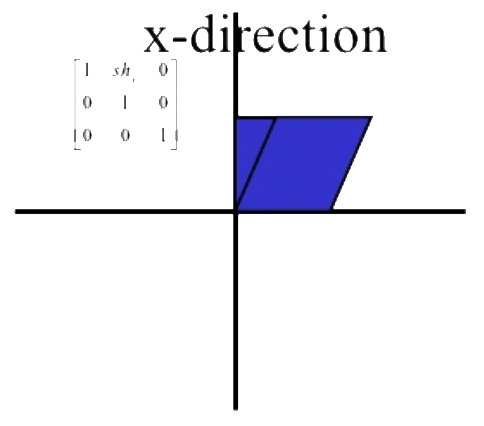
A shear parallel to the x axis has x' = x + sh and y' = y. Written in matrix form, this becomes:


| 1 | sh | 0 | 0 |
| 0 | 1 | 0 | 0 |
| 0 | 0 | 1 | 0 |
| 0 | 0 | 0 | 1 |
The Y-Shear preserves the X coordinates and changes the Y coordinates which causes the horizontal lines to transform into lines which slopes up or down as shown in the following figure.
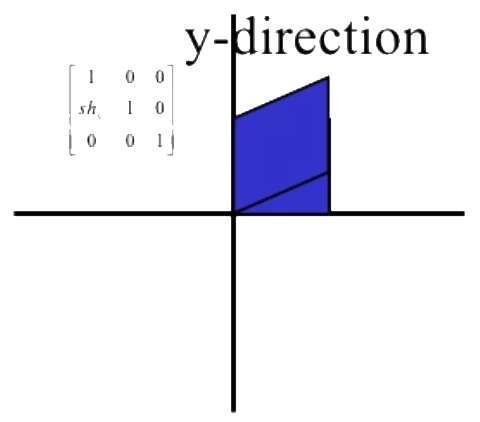
A shear parallel to the y axis has x' = x and y' = y + sh, which has matrix form


| 1 | 0 | 0 | 0 |
| sh | 1 | 0 | 0 |
| 0 | 0 | 1 | 0 |
| 0 | 0 | 0 | 1 |
Transform node with Matrix
Download Transform Matrix
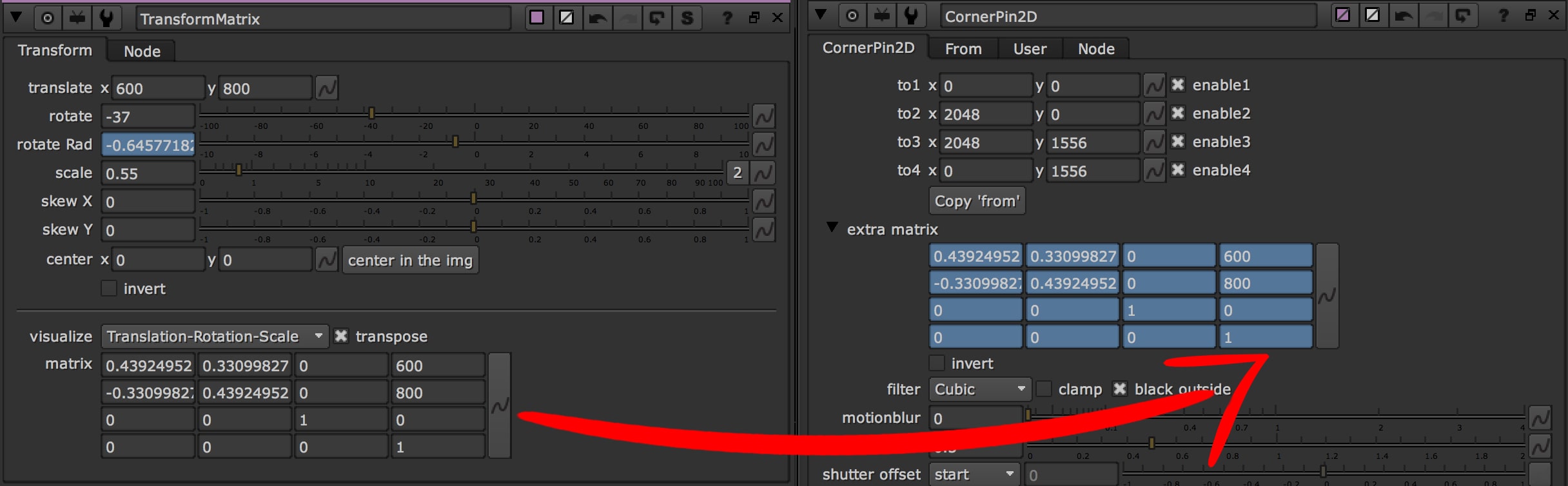
I've modified the Transform node of Nuke, adding a Matrix to visualize the same transformation with a Matrix4x4.
It has the basic knobs of a classic Transform node, but with a custom area for the Matrix.
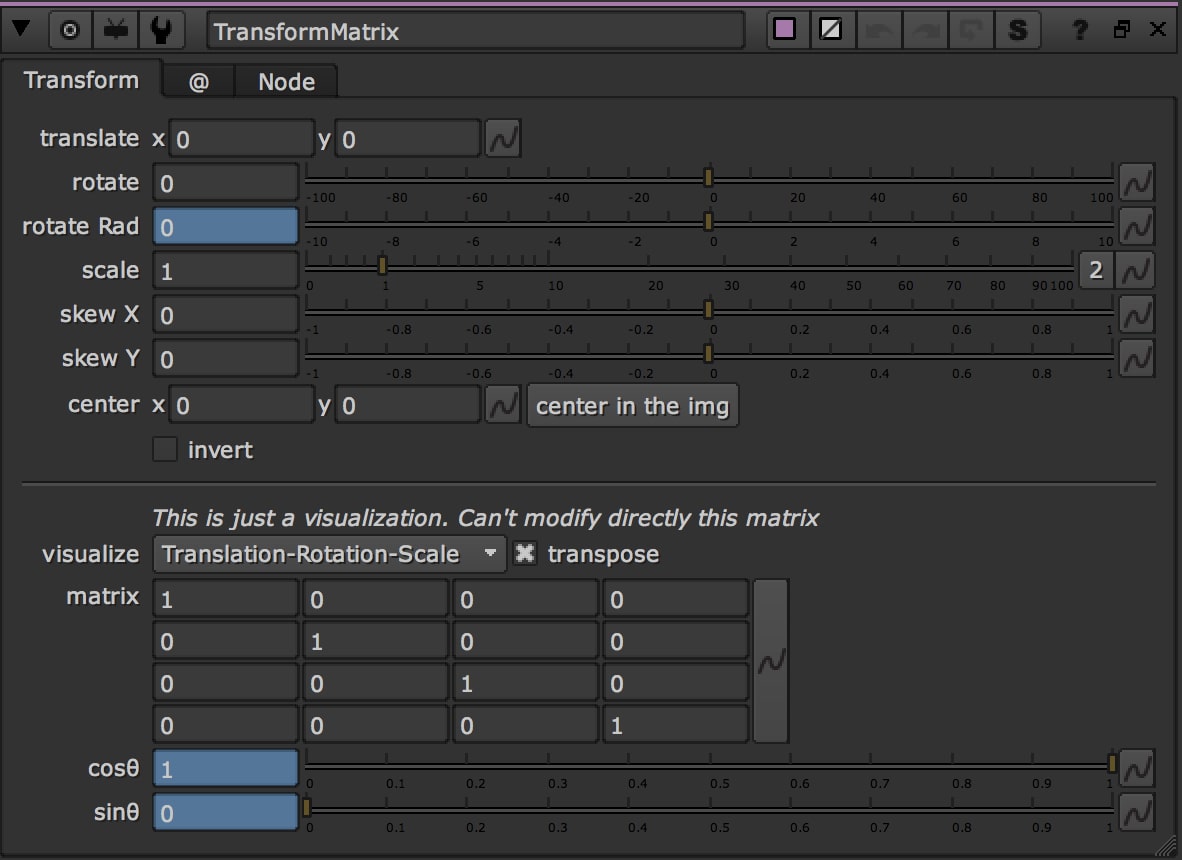
As you can see, you can't paste a matrix, only copy it.
Also, if you wish, just select the Transformation you want to visualize: Translate, Rotate or Scale.

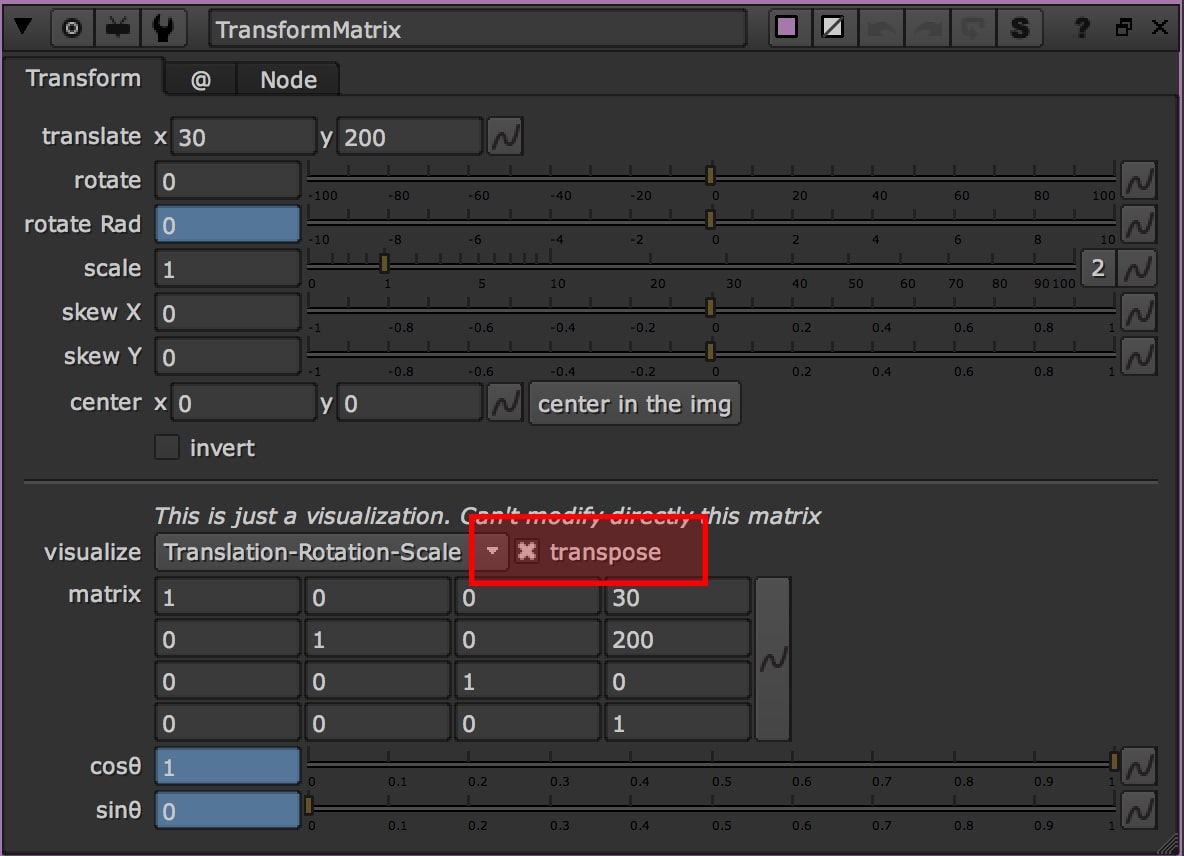
- Transpose
The transpose of a matrix is an operator which flips a matrix over its diagonal, that is it switches the row and column indices of the matrix by producing another matrix denoted as AT

If you try to print the knob matrix in Python, you will get the Transpose Matrix. This is because (I assume) Nuke isn't consistent in how it outputs matrices. That's why I added the checkbox Transpose in the TransformMatrix.
Enabling the transpose checkbox, you will see how the matrix changes.

- How to use the Matrix
I said that you can't interact directly with the matrix in the TransformMatrix node, but at least you can copy it.
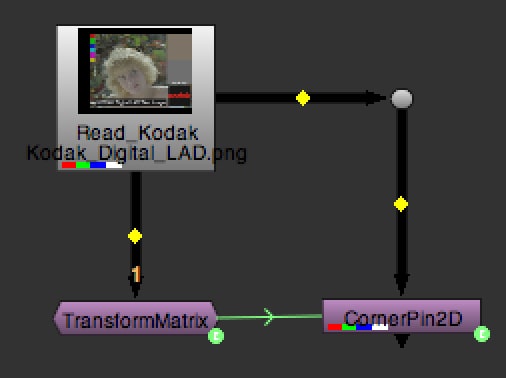
Let's start by creating the TransformMatrix and changing its values, then create a CornerPin without changing its values


Now you can copy/paste the matrix to the extra_matrix knob in the CornerPin, or create an Expression.
If you check the results, you will get the same result in both nodes

Corner Pin node with Matrix
- Special Thanks to Julik for his tutorial: http://gist.github.com/julik/1164618
Download Corner Pin 2D Matrix
As before, I also modified the CornerPin2D node. In this case we can see how to use this node.

In this example, connect the CornerPin_Matrix to the image and modify the pins.
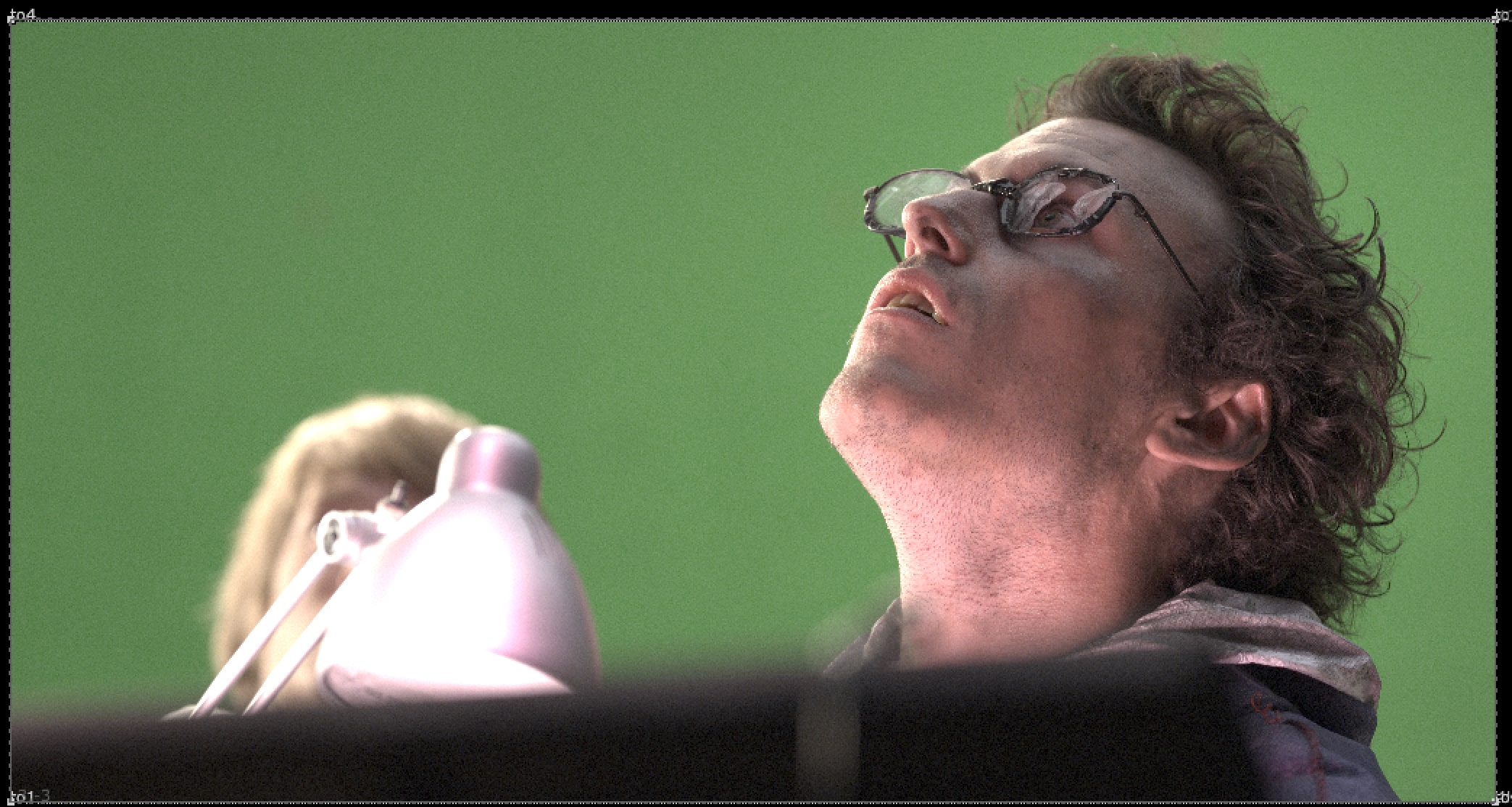

There is a useful checkbox to invert the matrix. In this case we can copy the matrix into another CornerPin and then copy the inverse matrix into a third CornerPin. The final result will be the original picture
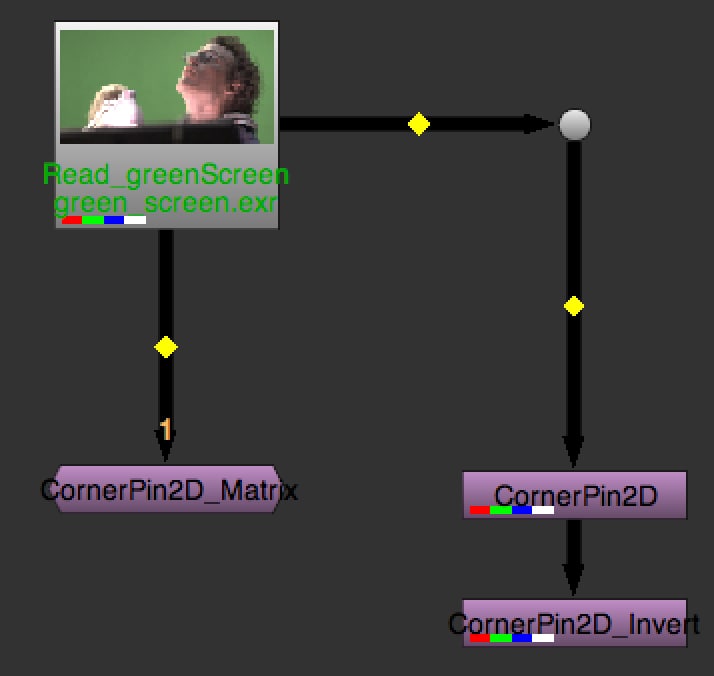
In this case you can modify the picture with the Matrix and add other changes with the Pins.