

ACES confuses everyone at the start, and the questions are always the same: which config, which colour space on the Read, why the image looks darker, why the logo isn't white any more, what changed with ACES 2.0. This page answers them one by one, short, with the names you actually see in Nuke 17. Every number comes from Nuke 17.0v1 and its built-in OCIO configs: I measured the roles, the defaults of the Read and the display values. Type in the search box to find your question, or open them all.
Index
- 01. The FAQ (27 questions)
- 02. Lab: the display transforms, ACES 2.0 against 1.3
- 03. Cheat sheet: Read and Write in Nuke 17
- 04. Setup assistant: ACES in your show, step by step
- 05. Helper: how to read a JPEG in Nuke 17
- 06. Useful links
01. The FAQ
The basics
What is ACES, in one paragraph?
ACES (Academy Color Encoding System) is a free colour management system from the Academy of Motion Picture Arts and Sciences. It defines a few standard colour spaces, a standard way to convert every camera into them (Input Transforms) and a standard way to show them on every screen (Output Transforms). The point is that a plate from an ARRI, a Sony, an iPhone and a CG render all end up in the same linear colour space, can be mixed without guessing, and look the same on every monitor in every company working on the film.
For a compositor it means three things: the Read converts every file into the working space (ACEScg), you comp in linear, and the Viewer shows the image through the Output Transform, which adds a film-like tone curve.
What changed in ACES 2.0, compared to 1.3?
ACES 2.0 (released in 2025) keeps the same colour spaces (ACEScg, ACES2065-1, ACEScct): your EXRs don't change. What changes is the Output Transform, the way the image is shown on screen:
- A new tone curve, a little softer: in my measures 18% grey goes to 0.349 on an sRGB screen (0.356 with 1.3), scene value 1.0 goes to 0.707 (0.812 with 1.3).
- A new gamut mapping, built on a colour appearance model: very saturated colours go towards white smoothly and keep their hue. In 1.3 a bright blue turned cyan or purple and a bright red turned orange (see the lights in question 20).
- Better inversion: you can go from the screen back to the scene more reliably, useful for logos and graphics.
- The same transforms for SDR and HDR, designed together, so an HDR and an SDR version look like the same film.
In practice: the same comp looks a little different in 2.0. Don't switch version in the middle of a show.
ACES2065-1, ACEScg, ACEScc, ACEScct: which is which?
| name | primaries | curve | what for |
|---|---|---|---|
| ACES2065-1 | AP0: very wide, contains every colour the eye can see | Linear | Archive and exchange between companies. Not for working: some of its primaries are outside the visible colours. |
| ACEScg | AP1: wide, a little bigger than Rec.2020 | Linear | The working space of CG and comp. This is what you comp in. |
| ACEScc | AP1 | Pure log | Grading. Rarely seen in comp. |
| ACEScct | AP1 | Log with a "toe" (the t) in the shadows | Grading, and in comp the operations that work better in log. 18% grey is 0.414. |
ACEScg and ACEScct are the same colours, only the curve is different: converting between them doesn't change hue or saturation.
IDT, ODT, RRT, LMT: what do the acronyms mean, and why have they changed?
- IDT, Input Device Transform, now called Input Transform: from a camera or a file into ACES. In Nuke it's the colour space of the Read (ARRI LogC4, Apple Log, sRGB Encoded Rec.709...).
- RRT (Reference Rendering Transform) and ODT (Output Device Transform): in ACES 1 the image went through both to reach the screen. Together they're now called the Output Transform: in Nuke, the view of the Viewer, for example "ACES 2.0 - SDR 100 nits (Rec.709)".
- LMT, Look Modification Transform: a creative look applied before the Output Transform, the same for the whole show. You meet it as a "show LUT" or a look in the config.
What is OCIO, and is it the same as ACES?
No. OpenColorIO (OCIO) is the software that does the colour conversions in Nuke, Maya, Houdini, Blender, Resolve and many other programs. A config (an .ocio file) lists the colour spaces, displays and views a project uses. ACES is one possible set of colour spaces and transforms; an OCIO config can contain ACES, or something else entirely (the old nuke-default, a studio's own system).
When people say "we work in ACES" they usually mean: an OCIO config with the ACES colour spaces, ACEScg as working space, and an ACES Output Transform in the Viewer.
Setting up Nuke 17
Which config do I choose in Nuke 17?
In Project Settings > Color, set the colour management to OCIO and choose a config. Nuke 17.0 ships these:
| config | ACES | what's in it |
|---|---|---|
| fn-nuke_studio-config-v3.0.0_aces-v2.0_ocio-v2.4 | 2.0 | 52 colour spaces: ACES, the camera log spaces (ARRI, Sony, RED, Canon, Panasonic, Blackmagic, Apple Log...), the utility spaces, many displays. The one to use for plates. |
| fn-nuke_cg-config-v3.0.0_aces-v2.0_ocio-v2.4 | 2.0 | 24 colour spaces: ACES and the utility spaces, no cameras. Enough for full CG. |
| fn-nuke_studio-config-v2.2.0_aces-v1.3_ocio-v2.4 | 1.3 | The studio config with the ACES 1.3 Output Transforms. For shows started in 1.3. |
| fn-nuke_cg-config-v2.2.0_aces-v1.3_ocio-v2.4 | 1.3 | The cg config with ACES 1.3. |
| aces_1.2 | 1.2 | The old OCIO v1 config: for old scripts. |
| nuke-default | none | Nuke's classic linear sRGB setup, without ACES. It's also what Nuke uses when it runs from the command line without a script. |
The rule: use the config of the show. If you're on your own and you start now, the studio config with ACES 2.0 is the most complete choice. Whatever you choose, it's saved in the script, so check it when you open somebody else's.
What are roles, and why does Nuke use them?
A role is a job name that points to a colour space: "the linear working space", "the log space", "the space for 8-bit textures". Nuke and other programs ask for the role, and the config decides which space it is. I read them from the three Nuke 17 configs: they are the same in all of them.
| role | colour space | where Nuke uses it |
|---|---|---|
| scene_linear | ACEScg | The working space; default for float files (EXR). |
| compositing_log | ACEScct | Default for log files (DPX, Cineon); the Log2Lin nodes. |
| matte_paint | ACEScct | Default for 8-bit files (JPG, PNG, 8-bit TIFF): see question 13. |
| texture_paint | sRGB Encoded Rec.709 (sRGB) | Default for 16-bit files. |
| color_picking | sRGB Encoded Rec.709 (sRGB) | The colour picker. |
| color_timing | ACEScct | Grading. |
| data | Raw | Data that must not be converted. |
| aces_interchange | ACES2065-1 | The reference for exchanging files. |
Which role each file type uses is set in Project Settings > Color, in the defaults for 8-bit, 16-bit, log and float files.
Which view should I use in the Viewer?
The studio config v3 has three views for every display:
- ACES 2.0 - SDR 100 nits (Rec.709): the default, and the one to judge your work with. It's the look the client sees.
- Un-tone-mapped: only the gamut and the display curve, no tone curve. Useful to check values, never to judge the look: everything above 1.0 clips hard.
- Raw: no conversion at all, you see the numbers as they are. For data passes, mattes, STMaps, normals.
The ACES 1.3 config has "ACES 1.0 - SDR Video", its "(D60 sim on D65)" variant, Un-tone-mapped and Raw.
My monitor is a P3 or an HDR screen: what do I pick?
The display must match the monitor, the view stays the same. The studio config v3 has: sRGB, Display P3, Display P3 HDR, P3-D65, Rec.1886 Rec.709, Rec.2100-HLG, Rec.2100-PQ and ST2084-P3-D65.
- A normal computer monitor: sRGB.
- A wide-gamut monitor set to P3, like most Mac screens: Display P3.
- A calibrated grading monitor for TV: Rec.1886 Rec.709.
- HDR: Rec.2100-PQ (or ST2084-P3-D65 for cinema HDR), on a real HDR monitor and with Nuke's HDR viewer set up. Choosing an HDR display on an SDR monitor just gives a wrong image.
How does the whole team use the same config?
With the OCIO environment variable: set it to the path of the show's config.ocio on every machine (and on the render farm). Nuke, Maya, Houdini and the others all read it, and Nuke uses it instead of its built-in configs. In a studio the pipeline does this for you; on your own, you can set it in your system, or choose the custom config in Project Settings.
Windows (Command Prompt), once: the config of the show for every program
setx OCIO "D:\shows\myshow\config\config.ocio"macOS or Linux, in ~/.zshrc or ~/.bashrc
export OCIO="/shows/myshow/config/config.ocio"I opened an old aces_1.2 script in Nuke 17: what now?
Nothing breaks: Nuke 17 still ships aces_1.2, and the script opens with it. The new configs also know the old names as aliases: in the studio v3 config, "Utility - sRGB - Texture" is an alias of "sRGB Encoded Rec.709 (sRGB)", so old Reads find their colour space.
Move a show to a new config only if the whole show moves: ACES 2.0 shows the same EXRs a little differently, so comps done in 1.2 and 2.0 won't match in the Viewer.
Read and Write
Which colour space do I set on the Read, for each kind of file?
| file | colour space on the Read |
|---|---|
| CG renders (EXR) from an ACES pipeline | ACEScg |
| EXR plates delivered "in ACES", or from the DI | Usually ACES2065-1: ask, or read the metadata |
| Camera files or log DPX | The camera's log space: ARRI LogC4 or LogC3, S-Log3, V-Log, Log3G10, Apple Log... |
| Photos, textures, logos, graphics (JPG, PNG, 8-bit TIFF) | sRGB Encoded Rec.709 (sRGB): question 15 |
| An HDRI (EXR or HDR) from a non-ACES program | Usually Linear Rec.709 (sRGB) |
| Editorial QuickTimes (references) | Rec.709 (Gamma 2.4 Encoded Rec.709) or what editorial says |
| Mattes, depth, normals, motion vectors, STMaps, IDs | Raw: never convert data |
When you don't know, ask whoever made the file. A wrong guess is invisible in a grey render and obvious in a red car.
Why does Nuke 17 read my JPG as ACEScct?
Because of the defaults. I created Reads in Nuke 17.0v1 with the ACES 2.0 configs, and these are the colour spaces they pick by themselves:
| file | default on the Read | which means | is it right? |
|---|---|---|---|
| EXR (float) | default (scene_linear) | ACEScg | Yes, for CG renders |
| JPG, PNG, 8-bit TIFF | default (matte_paint) | ACEScct | No for photos and textures: set sRGB Encoded Rec.709 (sRGB) |
| 16-bit PNG or TIFF | default (texture_paint) | sRGB Encoded Rec.709 (sRGB) | Usually yes |
| DPX | default (compositing_log) | ACEScct | Only if the DPX is really ACEScct: camera DPX need the camera's log |
| QuickTime | Gamma 2.2 Encoded Rec.709 | Check it against editorial |
An 8-bit sRGB image read as ACEScct comes out too dark in the shadows and far too bright in the highlights. Set the Read by hand, or change the default for 8-bit files in Project Settings > Color to texture_paint (sRGB).
What do I Write, and in which colour space?
- Comps, precomps, renders for other artists: EXR in ACEScg, 16-bit half. That's the default of a Write in an ACES config (scene_linear). Use 32-bit float only for data that needs it (depth, positions, STMaps).
- Delivery to the DI: what the show asks. Often EXR in ACES2065-1, sometimes in the camera's log as DPX or EXR. The specs are in the delivery document: read them.
- Previews and dailies (QuickTime, JPG): with the Output Transform applied, so they look like your Viewer. In the Write set transform type to display, then the display (sRGB or Rec.1886) and the view (ACES 2.0 - SDR 100 nits).
- Data (mattes, STMaps): Raw.
How do I bring a logo, a texture or a photo into an ACES comp?
There are two ways, and they give different results:
- sRGB Encoded Rec.709 (sRGB) (once called Utility - sRGB - Texture): the image becomes linear light with its sRGB colours. White 1.0 stays 1.0 in the scene, and in the Viewer it looks a bit darker and less saturated, because the Output Transform's tone curve shows 1.0 as 0.707. Right for textures, photos, anything that must behave like a real object in the light.
- The inverse of the Output Transform (the display colour space, e.g. sRGB - Display with the ACES view, inverted): the image comes back on screen exactly as it was. But to do it the values grow a lot: in my measures display white 1.0 needs scene value 128 with ACES 2.0 (16.3 with ACES 1.3). Right for logos and graphics that must look exact, and only if nothing (blur, glow, motion blur) touches them in the comp.
All the details, with the values and images: my page 8-bit images in ACES.
Why do I get negative values?
Because the colour spaces have different primaries, and a colour that exists in one may be outside the other. Pure red in ACEScg, (1, 0, 0), converted to linear Rec.709 gives (1.705, −0.130, −0.024) in my measures: it's a red more saturated than any Rec.709 screen can show, and the only way to write it in Rec.709 numbers is with negatives.
- They are not an error: don't clamp them in the middle of a comp, or you change the colour.
- Negatives can break some operations (a divide, a log, a keyer, a gamma in a Grade): check those nodes when you see strange black or NaN pixels.
- In the other direction there's no problem: every sRGB colour is inside ACEScg. Red (1, 0, 0) in an sRGB texture becomes (0.613, 0.070, 0.021) in ACEScg.
ACEScg or ACES2065-1 for the files I send out?
Inside the VFX company, ACEScg: it's what everyone works in. Between companies and to the DI, the ACES standard says ACES2065-1 (the "aces_interchange" role): it's the archival format, and the files are marked as such. Most shows say it in the specs; when they don't, ask, and write the colour space in the name of the folder or in the metadata.
The same pixel is very different in the two: ACEScg (0.18, 0.05, 0.02) is (0.136, 0.053, 0.019) in ACES2065-1. Read in the wrong space, the colours shift visibly.
Looking at the image
Why does my image look darker, or less contrasty, in ACES?
Because of the tone curve of the Output Transform. In the old linear sRGB setup, a value of 1.0 in the scene was white on screen. With ACES, the scene can go much higher than 1.0, and the Output Transform needs room to show it: so scene 1.0 is shown at 0.707 with ACES 2.0 (0.812 with 1.3), and only very high values reach white. 18% grey is shown at 0.349 instead of 0.461. Move the line on the image:
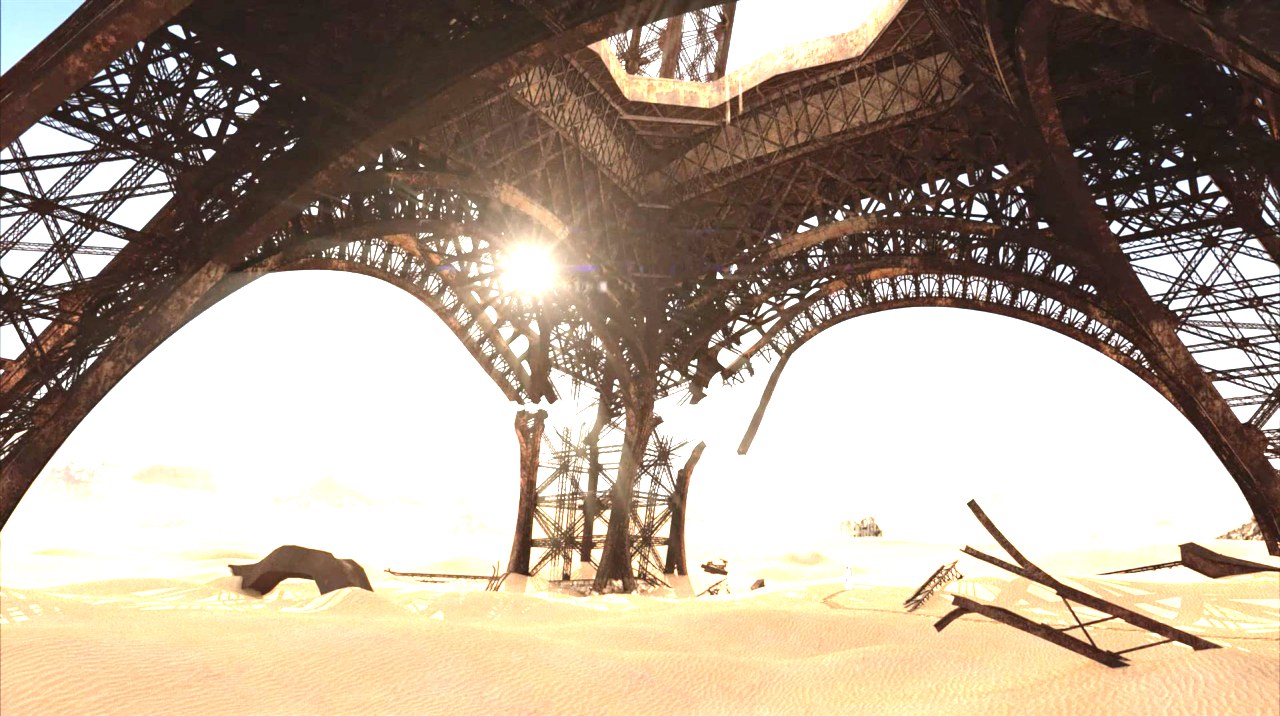
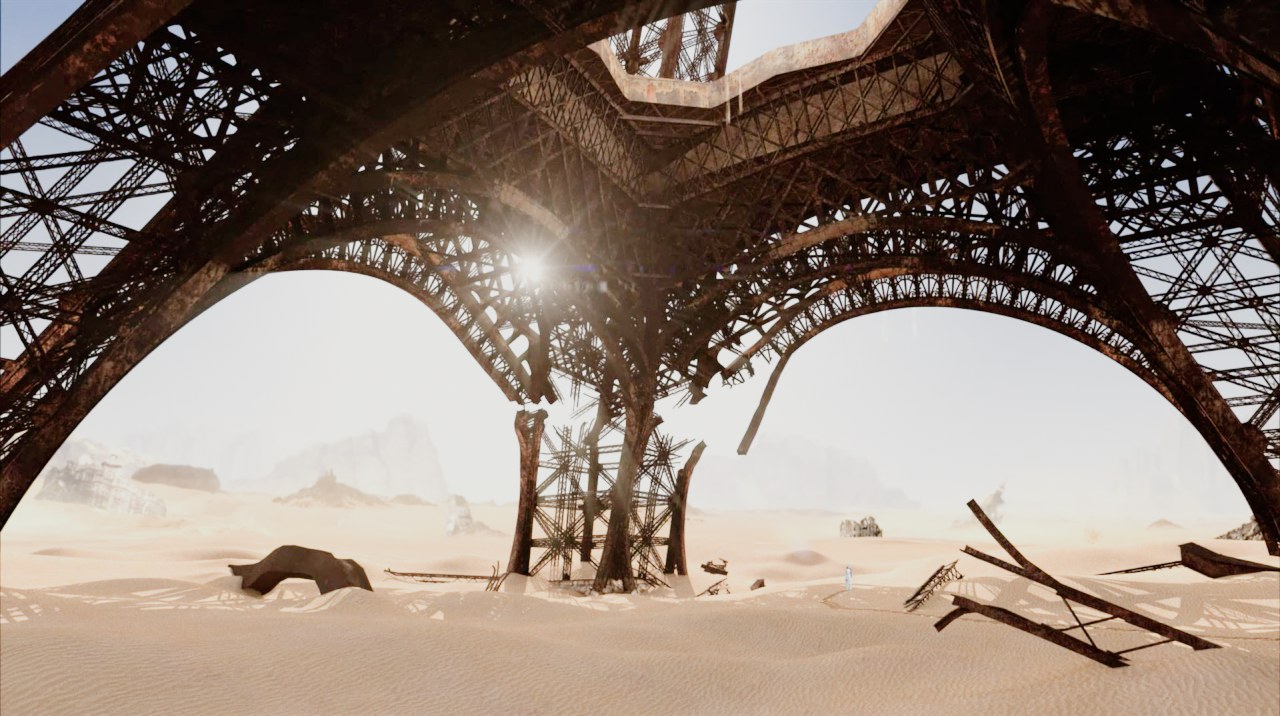
A frame of Climax, one of my personal projects, pushed two stops brighter (×4) in ACEScg and rendered from Nuke 17 with the two views of the studio config. Un-tone-mapped clips everything above 1.0; the ACES curve rolls the highlights off.
The lab in section 02 shows the whole curve.
Why isn't my white 1.0 white on screen?
Same reason: 1.0 in the scene is a bright diffuse white, not the brightest thing the screen can show. With ACES 2.0 on an sRGB screen I measured: scene 1.0 → 0.707, 2 → 0.82, 4 → 0.90, 8 → 0.948, 16 → 0.975, 100 → 0.999. Going backwards, display 0.9 needs scene 4.0, display 0.99 needs 34.5, display 1.0 needs 128.
So a white wall at 1.0 looks light grey, and that's correct: the screen keeps its brightest values for lamps, the sun and speculars. If something must be exactly white on screen (a title, a UI), see question 15.
Why do bright saturated lights look different in ACES 1.3 and 2.0?
Because of the gamut mapping. I rendered rows of coloured lights (red, blue, green, orange), from exposure 0.5 to 16, through the two Output Transforms. Move the line:
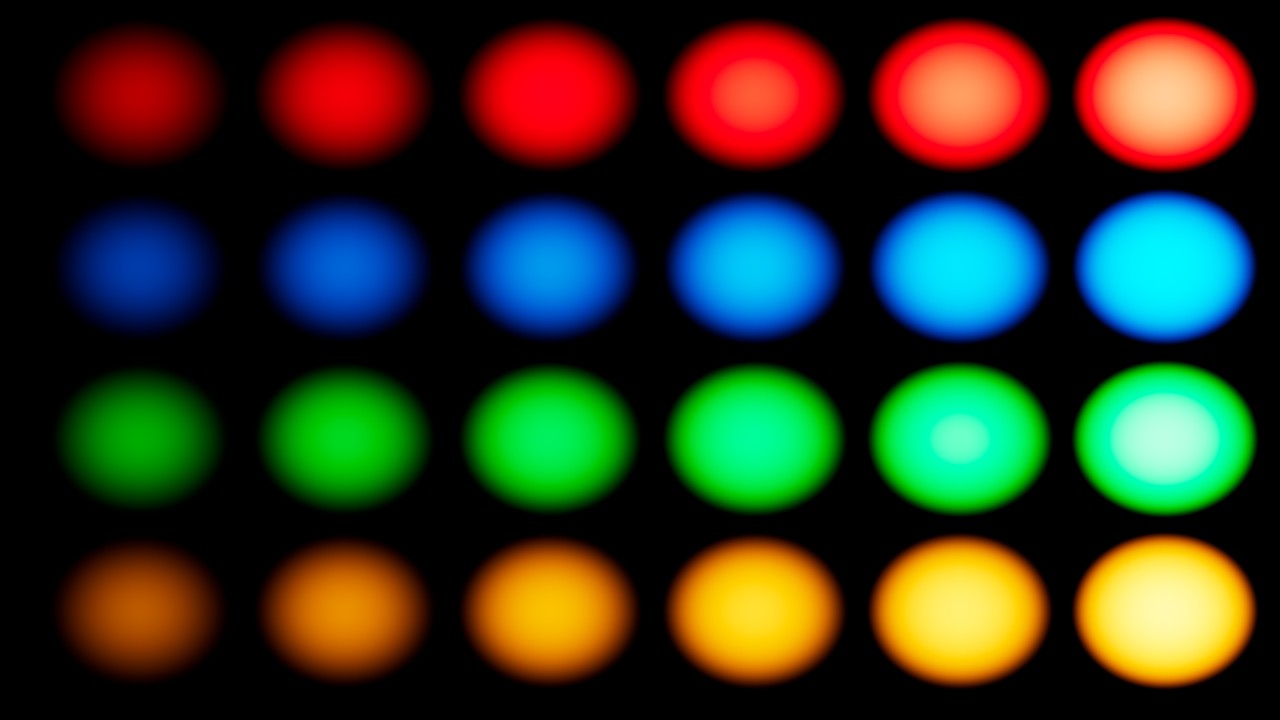
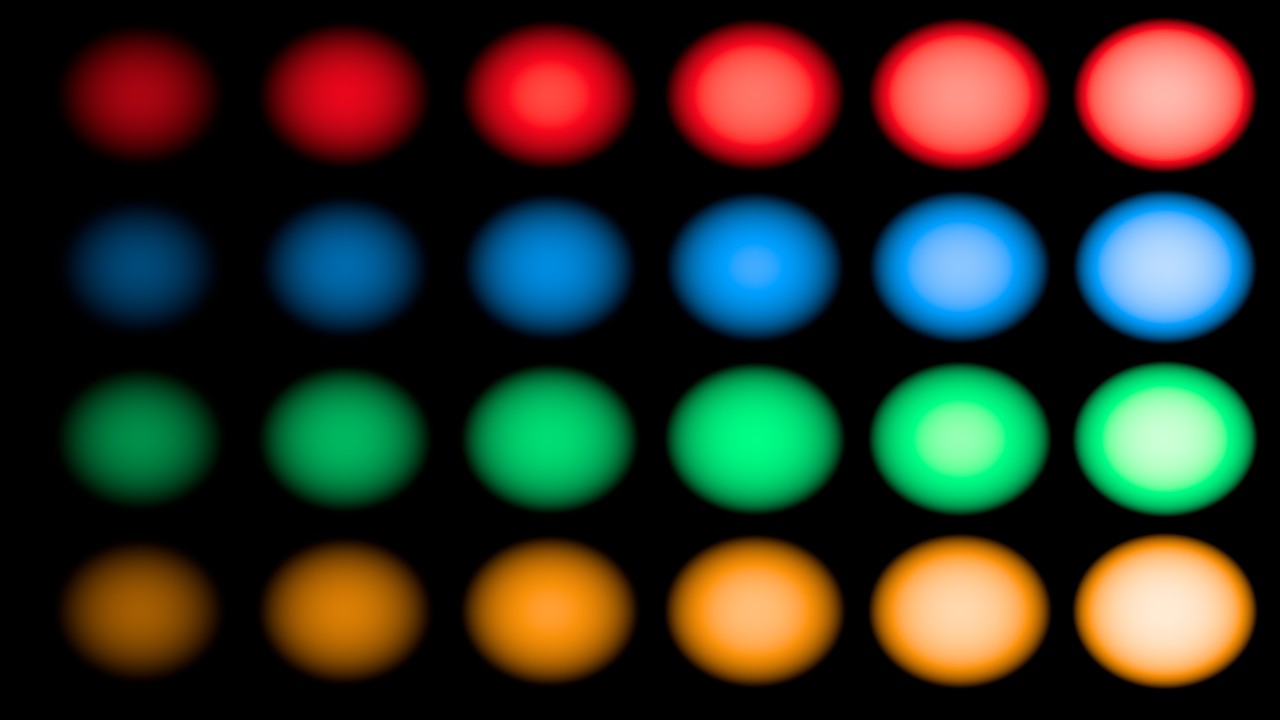
Rendered in Nuke 17 with the studio configs v2.2.0 (ACES 1.3) and v3.0.0 (ACES 2.0). Same EXR values, two Output Transforms.
- ACES 1.3: as the lights get brighter, blue turns cyan, red turns orange, and the colours stay saturated until they clip. A scene red of (4, 0, 0) gave (1.166, 0, 0.111) on an sRGB display: a value above 1, which the screen clips.
- ACES 2.0: the hue holds and the light goes towards white, like a real bright light or film. The same red gave (1.0, 0.371, 0.304).
- For comp it matters with neon, LEDs, fire, lasers, sci-fi glows and sky gradients: a look approved in 1.3 can change in 2.0.
Are values above 1.0 a problem?
No, in linear they're normal: the sun, a lamp, a specular highlight are much brighter than a white wall. Keep them: blurs, defocus, glows and motion blur look real only if the highlights keep their energy. Clamp only where a node needs it (some keyers, some filters) or on a matte, never on the whole image.
Should I comp in ACEScct?
No: comp in ACEScg, linear, where merges, blurs and light behave like light. Go to ACEScct only for a few operations that work better on a log image, and come back right after:
- Grading as a colourist would, with lift, gamma and gain on a log image.
- Some keyers and edge tools, which behave better when the values are spread evenly.
- Sharpening, and filters that ring around very bright highlights.
Use an OCIOColorSpace node from scene_linear to compositing_log and back (or a Log2Lin in the config's log). My page Linear and log explains why.
Why are the numbers in the colour picker different from the Viewer?
The Viewer shows the image through the Output Transform; the pixel values in the info bar are the real linear values of the image, before the transform. The colour picker uses the color_picking role (sRGB Encoded Rec.709 in these configs). When you match two images, compare the values, not what you see; when you judge the look, use the Viewer.
Practical
I'm freelance or working alone: do I need ACES?
Not always, but it helps. If your renders and plates come from different programs and cameras, ACES (or any OCIO config) gives you a single linear space and a good-looking display transform for free. What matters most is consistency: one config for the project, the right colour space on every Read, and the same view for everyone who looks at the work.
The 3D artist rendered in linear sRGB, not ACEScg: what do I do?
Read the EXR as Linear Rec.709 (sRGB). Nuke converts it to ACEScg: the colours are the same, only described with other primaries. Don't read it as ACEScg: the colours become more saturated and shift. Agree with the 3D department on one space for the whole show, and write it in the file names or the metadata.
The client sent a LUT: where does it go?
A show LUT is a look, and it belongs to the Viewer, not to the image: in a studio it's in the config, as a view or a look. On your own, put it in an input process or a Viewer node (a Vectorfield node, in the right colour space), so it changes what you see and not what you render. Ask which colour space the LUT expects: most show LUTs expect log (ACEScct or the camera's log), not linear.
How do I check the config and the colour spaces with Python?
Paste this in the Script Editor: it prints the config of the script, the default view, and the colour space of every Read.
Check the config and every Read in the script
import nuke
root = nuke.root()
print("Colour management:", root["colorManagement"].value())
print("Config:", root["OCIO_config"].value())
print("Viewer:", root["monitorLut"].value())
for r in nuke.allNodes("Read"):
    print(r.name(), "|", r["colorspace"].value(), "|", r["file"].value())
02. Lab: the display transforms, ACES 2.0 against 1.3
These are the curves I measured in Nuke 17 on the sRGB display, from scene linear to the value sent to the screen. The orange line is ACES 2.0, the blue one ACES 1.3, the dashed grey the un-tone-mapped view (the old linear sRGB look). Move the slider: it's the exposure in stops from 18% grey.
From scene linear to the sRGB display
Horizontal: stops from 18% grey (0 is 0.18, +2.47 is 1.0). Vertical: the display value, 1.0 is the white of the screen.
- Un-tone-mapped reaches 1.0 at scene 1.0 (+2.47 stops) and clips there: everything brighter is the same white.
- ACES 1.3 is a bit brighter and more contrasty in the middle, and reaches white at about 16 in the scene.
- ACES 2.0 is softer: it keeps more separation in the highlights and reaches white only at 128.
03. Cheat sheet: Read and Write in Nuke 17
| what | where | set it to |
|---|---|---|
| Config | Project Settings > Color | The show's config; on your own, fn-nuke_studio-config-v3.0.0 (ACES 2.0) |
| Working space | Project Settings > Color | scene_linear = ACEScg |
| Viewer | Viewer, top right | sRGB - Display / ACES 2.0 - SDR 100 nits (Rec.709) |
| 8-bit default | Project Settings > Color | texture_paint (sRGB) instead of matte_paint (ACEScct) |
| CG EXR | Read colorspace | ACEScg |
| Camera plate | Read colorspace | The camera's log (studio config) |
| JPG, PNG texture | Read colorspace | sRGB Encoded Rec.709 (sRGB) |
| Data passes | Read colorspace | Raw |
| Comp output | Write | EXR, 16-bit half, ACEScg (or the delivery spec) |
| Preview QuickTime | Write | transform type: display, sRGB or Rec.1886, ACES 2.0 view |
04. Setup assistant: ACES in your show, step by step
The FAQ answers one question at a time. This assistant puts them together for your project. Tell it which ACES your show uses, what camera shot the plates, what monitor you look at, what elements you have and what you deliver. It gives you the setup in order, with the exact names of Nuke 17: the config (and how to install it, if it isn't built in), the defaults to fix, the Viewer, every Read, every Write. At the end there is a Python script that applies it to your script. I checked every name in Nuke 17.0v1, and tested the script there.
Your ACES setup
Elements and deliveries accept more than one answer. The setup below updates as you click.
1 Which ACES does the show use? It's in the VFX specs, or ask the supervisor. On your own: ACES 2.0.
2 What shot the plates? The camera report or the clip metadata say it. Plates from the DI as EXR are usually ACES.
3 What do you look at?
4 Which elements go into the comp? Choose all that apply.
5 What do you deliver? Choose all that apply.
Python: the setup for a new script. Select the plate Reads first, paste it in the Script Editor and run it.
- ACES 1.2 in Nuke 17: it's still in the menu (aces_1.2), an OCIO v1 config with 353 colour spaces. It lacks the newer cameras (ARRI LogC4, Blackmagic Gen 5, Apple Log), and its defaults have two traps: 16-bit files are read as ACEScc, DPX as ADX10.
- A studio config: load it as custom in the Project Settings, or for every script with the OCIO environment variable. With OCIO set, Nuke 17 uses that config and greys out the menu: the show can't drift.
- The same show, the same config: everyone (comp, CG, the farm) must use the same config and the same view. A script opened with another config shows the same pixels differently, and nothing warns you.
05. Helper: how to read a JPEG in Nuke 17
The question I get most about ACES: "I read a JPEG and it looks wrong, which colour space do I pick?" There isn't one right answer. It depends on the config you comp in, on what the image is, and on what you want from it. Answer the four questions and the helper gives you the setting, the numbers it produces, how the image will look in the Viewer, and a Python snippet that sets your selected Reads. Every value and every picture below comes from Nuke 17.0v1. I measured them on a test chart and rendered the same JPEG, a frame of Pat the Dog, through every route.
Which colour space for this JPEG?
Not sure about an answer? Every question explains how to check.
1 How do you comp? Project Settings > Color: the colour management and the OCIO config
2 What is the image?
3 How do you want to see it?
4 Which colour profile is in the file? Photoshop: Edit > Assign Profile shows it. macOS: Preview > Tools > Show Inspector. Anywhere: exiftool -ICC_Profile:ProfileDescription file.jpg

Set the Read to
Python: select your Read nodes, paste in the Script Editor and run

What not to do: leave the default. In all four ACES configs of Nuke 17, the default for 8-bit files is the role matte_paint, which points to ACEScct, a log space. A JPEG read as log becomes huge: white turns into 222.9 and the red of the logo into 48.6. The image blows out like this one. Change the Read by hand, or change the 8-bit default in Project Settings > Color (question 13).

- Why the texture route looks darker: it keeps the file's white at 1.0, and the ACES view shows scene value 1.0 below display white, leaving room for highlights. With ACES 2.0 there is even more room: the same white is shown at 180 instead of 207. Nothing is broken: a white wall in a CG render looks the same way.
- Why the faithful route is risky: to come out of the view exactly as it went in, white has to go up to 16.3 (ACES 1.3) or 128 (ACES 2.0). A blur, a defocus, a motion blur or a glow on those values spreads a lot of light, and a Merge over CG makes a very hot edge. It's the right choice for things that must look exactly like the file, such as a logo, a phone screen or a client's reference frame. It's the wrong choice for elements that sit in the scene.
- Going back to JPEG: on the Write, for the faithful route use the display transform (sRGB - Display with the same view). I measured the round trip: within 1.6 codes of the original, which is just JPEG rounding. For the texture route, a Write in sRGB Encoded Rec.709 gives you back the original pixels. A Write through the view gives you what the Viewer shows, darker.
- The long story, with the maths of the 16 and the 128, is on 8-bit images in an ACES comp.